 Steve Langasek has announced the availability of the fourth alpha build of Ubuntu 9.04, code name "Jaunty Jackalope": "Welcome to Jaunty Jackalope Alpha 4, which will in time become Ubuntu 9.04. It includes a number of software updates that are ready for large-scale testing." New features: "Updated packages; the latest X.Org server, version 1.6; font dot-per-inch settings are now optimized based on your monitor's capabilities; new style for notifications and notification preferences; Linux kernel 2.6.28; option of installing on the new ext4 file system, ext3 remains the default." Read the release announcement and release notes for further details and known issues. Download (MD5): jaunty-desktop-i386.iso (690MB, torrent), jaunty-desktop-amd64.iso (695MB, torrent). Most other Ubuntu sub-projects have also released new alpha images; these include Kubuntu (download, release notes), Xubuntu (download) and Ubuntu Studio (download).
6 Şubat 2009 Cuma
Development Release: Ubuntu 9.04 Alpha 4
Steve Langasek has announced the availability of the fourth alpha build of Ubuntu 9.04, code name "Jaunty Jackalope": "Welcome to Jaunty Jackalope Alpha 4, which will in time become Ubuntu 9.04. It includes a number of software updates that are ready for large-scale testing." New features: "Updated packages; the latest X.Org server, version 1.6; font dot-per-inch settings are now optimized based on your monitor's capabilities; new style for notifications and notification preferences; Linux kernel 2.6.28; option of installing on the new ext4 file system, ext3 remains the default." Read the release announcement and release notes for further details and known issues. Download (MD5): jaunty-desktop-i386.iso (690MB, torrent), jaunty-desktop-amd64.iso (695MB, torrent). Most other Ubuntu sub-projects have also released new alpha images; these include Kubuntu (download, release notes), Xubuntu (download) and Ubuntu Studio (download).


3 Şubat 2009 Salı
NVIDIA System Tools v6.03
NVIDIA System Tools with ESA Support
Version: 6.03
Release Date: 09.01.2009
Operating System: Windows XP 32-bit, Windows XP 64-bit,
Windows Vista 32-bit, Windows Vista 64-bit
Language: English (International)
File Size: 62.32MB
NVIDIA System Tools v6.03
Version: 6.03
Release Date: 09.01.2009
Operating System: Windows XP 32-bit, Windows XP 64-bit,
Windows Vista 32-bit, Windows Vista 64-bit
Language: English (International)
File Size: 62.32MB
NVIDIA System Tools v6.03
Dox Optimised nVidia 185.20
There is alot of interest in this driver so here is it from me. I still recommend my 181.22.1 or 180.84.1 since these were leaked and may not be as stable.
So don't blame me if you have strange problems . I tried to improve this where I can so checkout the release notes:
Release Highlights
-Supports all mobile cards from 6-GT100 series and quadro equivalent
-Added numerous OpenGL and DirectX performance and Image quality tweaks
-Options to install for Quality/Balance/Performance driver settings
-Added extra resolutions
-Optimised drivers
-Fixed sleep issue (not 100% sure it will work for everyone)
-Unlocked ambient occlusion setting in the Nvidia control panel (not 100% sure if all users will see this setting - Vista DX10 cards only?)
-Turned on Powermizer where it may have been disabled by default.
Download Links
XP_185.20 -20.9mb
Vista_185.20 -22.1mb
Vista64_185.20 -30.1mb
Discuss
So don't blame me if you have strange problems
. I tried to improve this where I can so checkout the release notes:Release Highlights
-Supports all mobile cards from 6-GT100 series and quadro equivalent
-Added numerous OpenGL and DirectX performance and Image quality tweaks
-Options to install for Quality/Balance/Performance driver settings
-Added extra resolutions
-Optimised drivers
-Fixed sleep issue (not 100% sure it will work for everyone)
-Unlocked ambient occlusion setting in the Nvidia control panel (not 100% sure if all users will see this setting - Vista DX10 cards only?)
-Turned on Powermizer where it may have been disabled by default.
Download Links
XP_185.20 -20.9mb
Vista_185.20 -22.1mb
Vista64_185.20 -30.1mb
Discuss
31 Ocak 2009 Cumartesi
PhysX 9.09.0121 is out
Released 30.1.09
34.5 MB
http://www.nvidia.com/object/physx_9.09.0121_whql.html
"Bug Fix update based on PhysX system software 9.09.0010 to resolve installation issues on non-English operating systems"
34.5 MB
http://www.nvidia.com/object/physx_9.09.0121_whql.html
"Bug Fix update based on PhysX system software 9.09.0010 to resolve installation issues on non-English operating systems"
Pardus Linux 2008.2 'Canis aureus'
 Ekin Meroğlu has announced the release of Pardus Linux 2008.2, an independently developed desktop distribution and live CD featuring a variety of unique technologies: "The second update release of Pardus Linux 2008, Pardus Linux 2008.2 'Canis aureus' is out. With this release, core technologies like PiSi and COMAR are updated to provide new features. YALI is also updated to offer a smoother and more reliable installation experience. The enhancements in Mudur initialization system provide a faster and more robust start-up process, along with a better remote file system support. Pardus is offered as two variants to support ever-increasing number of languages: one installation CD with support for Turkish and English only and another installation CD with support for 11 languages." Read the release announcement and release notesDownload: Pardus-2008.2-Canis-aureus.iso (696MB, MD5), Pardus-2008.2-Canis-aureus-International.iso (697MB, MD5). for more information.
30 Ocak 2009 Cuma
ATI Catalyst 9.1 WHQL Display Driver
 AMD’s award-winning ATI Catalyst graphics and HD video configuration software delivers unprecedented control of performance and visual quality with ATI Radeon™ graphics processors. Certified by Microsoft® Windows® Hardware Quality Labs (WHQL), ATI Catalyst drivers for Windows Vista® and Windows® XP operating systems deliver stable performance and push the limits of innovation with advanced user-oriented features. AMD’s award-winning ATI Catalyst graphics and HD video configuration software delivers unprecedented control of performance and visual quality with ATI Radeon™ graphics processors. Certified by Microsoft® Windows® Hardware Quality Labs (WHQL), ATI Catalyst drivers for Windows Vista® and Windows® XP operating systems deliver stable performance and push the limits of innovation with advanced user-oriented features. Precision controls for power users. Tweaks for gamers and video enthusiasts. Simple wizard-assisted setup, easy multi-monitor configuration, and ultra reliable operation for working professionals. New user or seasoned expert, ATI Catalyst puts you in charge of The Ultimate Visual Experience™. • Industry-leading performance. ATI Catalyst boosts graphics performance with every new monthly release, including enhancements for popular Direct3D and OpenGL game titles. The Catalyst™ Software Suite 9.1 contains the following: Caution: The Catalyst™ software driver and the Catalyst™ Control Center can be downloaded independently of each other. However, for maximum stability and performance AMD recommends that both components be updated from the same Catalyst™ release Caution: The Catalyst™ Control Center requires that the Microsoft .NET Framework version 2.0 be installed. Without .NET version 2.0 installed, the Catalyst™ Control Center will not launch properly and the user will see an error message. The latest version of the Catalyst™ software suite is designed to support the following Microsoft Windows platforms: AMD Desktop Product Family Support for both Windows Vista and XP: AMD Multimedia Family Product Support for both Windows Vista and XP: Note: ATI All-in-Wonder™ boards operate with AMD's Windows Vista ready display and capture drivers under the Windows Vista operating system. However, the Windows Vista Media Center application does not support TV/Capture functionality provided by the ATI All-in-Wonder™. TV/Capture functionality is qualified to function with Snaptream's BeyondTV 4.6 for Windows Vista. Other third party solutions (such as Arcsoft's Total Media 3) may support TV/Capture with the ATI All-in-Wonder™, but these applications have not been fully tested by AMD. |
27 Ocak 2009 Salı
Internet Explorer 8.0.6001.18372 RC 1
 Internet Explorer 8 takes the Web experience beyond the page and introduces a new way to seamlessly experience the power of the Web whether you are a Web developer writing to standards, or an end user discovering a new online service. This beta release is available to everyone, but is primarily for Web developers and designers to test the new tools, layout engine, and programming enhancements. Internet Explorer 8 takes the Web experience beyond the page and introduces a new way to seamlessly experience the power of the Web whether you are a Web developer writing to standards, or an end user discovering a new online service. This beta release is available to everyone, but is primarily for Web developers and designers to test the new tools, layout engine, and programming enhancements. Internet Explorer 8 (IE8) has been designed to make everyday tasks easier, provide dynamic security protection and improve the development platform and manageability. End user improvements include a streamlined interface, tabbed browsing, printing advances, improved search functionality, instant feeds (RSS), dynamic security protection, and more. This RC version of Internet Explorer is for web developers and designers. We invite you to use the resources listed below to learn about the improvements, changes and new features available in this release. "This release contains some great advances in Cascading Style Sheets (CSS) and layout, programming model, performance, reliability, usability and service integration. We are eager to ensure that the transition to Internet Explorer 8 is seamless for you and your audience, and to give you a head start on using many of the new features with your sites and services. We encourage you to test your sites and services, and our platform implementation, and give us feedback!" Developers and designers of all skill levels need great tools to deliver modern websites and write more efficient code without having to switch between the browser and a separate development environment. Internet Explorer 8 includes built-in tools that work well for professionals as well as those trying CSS and scripting for the first time. - Debug JavaScript Windows Internet Explorer 8 Beta 2 Release Notes Homepage - http://www.microsoft.com Download Internet Explorer 8 RC1 for Windows XP/2003 x32 - 16.1 MB Download Internet Explorer 8 RC1 for Windows XP/2003 x64 - 32.4 MB Download Internet Explorer 8 RC1 for Windows Vista/2008 x32 - 13.2 MB Download Internet Explorer 8 RC1 for Windows Vista/2008 x64 - 24.1 MB |
24 Ocak 2009 Cumartesi
Distribution Release: Ubuntu 8.04.2
An updated set of CD and DVD images of Ubuntu 8.04, a distribution with long-term security support (5 years on servers, 3 years on desktops), was released today: "The Ubuntu team is proud to announce the release of Ubuntu 8.04.2 LTS, the second maintenance update to Ubuntu's 8.04 LTS release. This release includes updated server, desktop, and alternate installation CDs for the i386 and amd64 architectures. In all, over 200 updates have been integrated, and updated installation media has been provided so that fewer updates will need to be downloaded after installation. These include security updates and corrections for other high-impact bugs, with a focus on maintaining stability and compatibility with Ubuntu 8.04 LTS." Read the release announcement and summary of changes for a detailed list of all updates. Download (MD5): ubuntu-8.04.2-desktop-i386.iso (698MB, torrent), ubuntu-8.04.2-desktop-amd64.iso (696MB, torrent).
23 Ocak 2009 Cuma
Microsoft delays Windows Vista SP2 by a month
Tech ARP reports that Windows Vista SP2 might be delayed until March. Microsoft will deliver a Release Candidate of Windows Vista Service Pack 2 in March and not in February. Also, Microsoft will send the service pack build to OEM and retailers only in the second quarter of 2009 and not in April.
Below are the scheduled dates as predicted by TechARP:
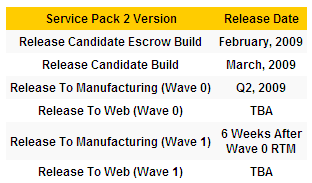
Image Courtesy: Tech ARP
The time delay between RTM and Public Versions release is hard to predict as there was a delay of 2 weeks between Windows XP SP3's RTM and Public Versions and 6 weeks delay in case of Windows Vista SP1.
Microsoft is releasing a Release Candidate (RC) Escrow Build in February instead of the normal RC build. The Escrow Build is a build where development halts and developers & beta testers start testing the product for any show-stopper bugs.
Microsoft has announced that it is not mandatory for OEMs to install Windows Vista SP2 and is marked as an optional install. This clearly shows that Microsoft indeed wants everybody to move to Windows 7. Many OEMs will be hesitant about spending more money and effort for qualifying new builds with their products. It becomes the sole responsibilty of the consumer now to update to Vista SP2.
In a nutshell, Microsoft has delayed the Windows Vista SP2 release by a month and who knows, you might get another Windows 7 build in the mean time!
However, the big question now is: Will you be installing Windows Vista SP2 or Wait for Windows 7?
Below are the scheduled dates as predicted by TechARP:
Image Courtesy: Tech ARP
The time delay between RTM and Public Versions release is hard to predict as there was a delay of 2 weeks between Windows XP SP3's RTM and Public Versions and 6 weeks delay in case of Windows Vista SP1.
Microsoft is releasing a Release Candidate (RC) Escrow Build in February instead of the normal RC build. The Escrow Build is a build where development halts and developers & beta testers start testing the product for any show-stopper bugs.
Microsoft has announced that it is not mandatory for OEMs to install Windows Vista SP2 and is marked as an optional install. This clearly shows that Microsoft indeed wants everybody to move to Windows 7. Many OEMs will be hesitant about spending more money and effort for qualifying new builds with their products. It becomes the sole responsibilty of the consumer now to update to Vista SP2.
In a nutshell, Microsoft has delayed the Windows Vista SP2 release by a month and who knows, you might get another Windows 7 build in the mean time!
However, the big question now is: Will you be installing Windows Vista SP2 or Wait for Windows 7?
Winamp 5.55 Build 2345 Beta
 Nullsoft Winamp is a fast, flexible, high-fidelity media player for Windows. Winamp supports playback of many audio (MP3, OGG, AAC, WAV, MOD, XM, S3M, IT, MIDI, etc) and video types (AVI, ASF, MPEG, NSV), custom appearances called skins (supporting both classic Winamp 1.x/2.x skins and Winamp 3 freeform skins), audio visualization and audio effect plug-ins (including two industry dominating visualization plug-ins), an advanced media library, Internet radio and TV support, CD ripping, and CD burning. Nullsoft Winamp is a fast, flexible, high-fidelity media player for Windows. Winamp supports playback of many audio (MP3, OGG, AAC, WAV, MOD, XM, S3M, IT, MIDI, etc) and video types (AVI, ASF, MPEG, NSV), custom appearances called skins (supporting both classic Winamp 1.x/2.x skins and Winamp 3 freeform skins), audio visualization and audio effect plug-ins (including two industry dominating visualization plug-ins), an advanced media library, Internet radio and TV support, CD ripping, and CD burning.• The Full version plays MP3s, AAC, WMA, and more; Compatible with Winamp 2 Plug-ins; Full Support for classic and modern skins; Plays Videos; has a Powerful Media Library; Browse Internet Radio & TV Stations; Integrated Internet Music Videos & Songs; Bundled Visualizations; and Burn & Rip CDs. • The LITE version plays MP3s, AAC, WMA, and more. It is compatible with Winamp 2 Plug-ins and has full support for classic skins. Winamp Highlights: Winamp Player Features: Changes in Winamp 5.55: Homepage - http://www.winamp.com Download Winamp 5.55 Beta Full (US English version) Download Winamp 5.55 Beta Full (Multi-national installer) Download Winamp 5.55 Beta Pro (US English version, asks for key during install) Download Winamp 5.55 Beta Lite (basic 2.x-style mp3/cd player) - Download Winamp 5.541.2189 Full (Multi-national installer) Download Winamp 5.541.2165 Full (US English installer) Download Winamp 5.541.2189 Pro (Multi-national installer, asks for key during install) Download Winamp 5.541.2165 Pro (US English Pro installer, asks for key during install) Download Winamp 5.541 Lite (basic 2.x-style mp3/cd player) |
nVIDIA ForceWare 181.22 [WHQL] Graphics Drivers for Windows XP
 nVIDIA ForceWare software unleashes the full power and features in nVIDIA's desktop, gaming, platform, workstation, laptop, multimedia, and mobile products. Delivering a proven record of compatibility, reliability, and stability with the widest range of games and applications, ForceWare software ensures the best experience with your nVIDIA hardware. nVIDIA ForceWare software unleashes the full power and features in nVIDIA's desktop, gaming, platform, workstation, laptop, multimedia, and mobile products. Delivering a proven record of compatibility, reliability, and stability with the widest range of games and applications, ForceWare software ensures the best experience with your nVIDIA hardware.• Incredible 3D and video performance for all of your applications. • Rock-solid system stability, greater compatibility, and reliability with nVIDIA® Unified Driver Architecture (UDA). • Industry-leading features for graphics, audio, video, communications, storage, and security. • Robust product support for over ten unique operating systems. • Continual product performance and feature updates for the life of your nVIDIA hardware. Official, WHQL Certified Drivers for nVIDIA GeForce graphics cards, for Windows XP/ 2000/ Windows XP Media Center Edition and Windows XP x64/ Server 2003 x64 OS. New in Release 181.22: Release Highlights: Blazing Fast Performance: And More: *Note: The following SLI features are only supported on Windows Vista: Quad SLI technology using GeForce 9800 GX2, 3-way SLI technology, Hybrid SLI, and SLI multi-monitor support. Supported Products: |
nVIDIA ForceWare 181.22 [WHQL] Graphics Drivers for Vista
nVIDIA ForceWare software unleashes the full power and features in nVIDIA's desktop, gaming, platform, workstation, laptop, multimedia, and mobile products. Delivering a proven record of compatibility, reliability, and stability with the widest range of games and applications, ForceWare software ensures the best experience with your nVIDIA hardware.• Incredible 3D and video performance for all of your applications.
• Rock-solid system stability, greater compatibility, and reliability with nVIDIA® Unified Driver Architecture (UDA).
• Industry-leading features for graphics, audio, video, communications, storage, and security.
• Robust product support for over ten unique operating systems.
• Continual product performance and feature updates for the life of your nVIDIA hardware.
NVIDIA has released the following WHQL certified drivers for use with Windows Vista RTM that will enable you to test the basic features and capabilities of the new operating system. NVIDIA is committed to supporting Microsoft Windows Vista on current and previous GPU generations. It's important to us that you have an excellent experience through the Vista transition, and driver development is the highest priority in our company.
New in Release 181.22:
* This driver is recommended for the best GPU PhysX experience in EA’s hot PC title Mirror’s Edge.
* This driver package automatically installs the new PhysX System Software version 9.09.0010.
* Additional information on specific bug fixes can be found in the release documentation notes.
Release Highlights:
Exciting New Features:
* Added support for GeForce GTX 295 and GeForce GTX 285
* Enables NVIDIA SLI technology on SLI-certified Intel X58-based motherboards with all SLI-certified GPUs.
* Enables NVIDIA SLI Multi-monitor support, giving you the ability to use two monitors with your GeForce graphics cards in SLI mode. Now you can easily switch between multi-monitor desktop mode and full screen 3D gaming mode. Learn more here.
* Enables NVIDIA PhysX acceleration on a dedicated GeForce graphics card. Use one card for graphics and dedicate a different card for PhysX processing for game-changing physical effects. Learn more here. (Note: GPU PhysX is supported on all GeForce 8-series, 9-series and 200-series GPUs with a minimum of 256MB dedicated graphics memory. This driver package automatically installs PhysX System Software version 8.10.13).
* Supports GeForce Plus Power Pack #2. Download these free PhysX and CUDA applications now!
* Added support for the new NVIDIA CUDA Video Encoder with H.264 optimization
Blazing Fast Performance:
* Boosts performance in numerous 3D applications. The following are some examples of improvements measured with Release 180 drivers vs. Release 178 drivers (results will vary depending on your GPU, system configuration, and game settings):
o Up to 10% performance increase in 3DMark Vantage (performance preset)
o Up to 13% performance increase in Assassin's Creed
o Up to 13% performance increase in BioShock
o Up to 15% performance increase in Company of Heroes: Opposing Fronts
o Up to 10% performance increase in Crysis Warhead
o Up to 25% performance increase in Devil May Cry 4
o Up to 38% performance increase in Far Cry 2
o Up to 18% performance increase in Race Driver: GRID
o Up to 80% performance increase in Lost Planet: Colonies
o Up to 18% performance increase in World of Conflict
And More:
* Supports single GPU and NVIDIA SLI technology on DirectX 9, DirectX 10, and OpenGL, including 3-way and Quad SLI technology.
* Supports CUDA.
* Supports Folding@home distributing computing application. Download the high performance client for NVIDIA GPUs here and join the NVIDIA team: #131015.
* Supports GPU overclocking and temperature monitoring by installing NVIDIA System Tools software.
* Includes numerous 3D application compatibility fixes. Please read the release notes for more information on product support, features, driver fixes and known compatibility issues
* Users without US English operating systems can select their language and download the International driver here.
This is a WHQL-certified driver for GeForce 6, 7, 8, 9, and 200-series desktop GPUs.
Supported Products:
GeForce GTX 295
GeForce GTX 285
GeForce GTX 280
GeForce GTX 260
GeForce 9800 GX2
GeForce 9800 GTX+
GeForce 9800 GTX
GeForce 9800 GT
GeForce 9600 GT
GeForce 9600 GSO
GeForce 9500 GT
GeForce 9500 GS
GeForce 9400 GT
GeForce 9400
GeForce 9300 GS
GeForce 9300 GE
GeForce 9300
GeForce 9200
GeForce 8800 Ultra
GeForce 8800 GTX
GeForce 8800 GTS 512
GeForce 8800 GTS
GeForce 8800 GT
GeForce 8800 GS
GeForce 8600 GTS
GeForce 8600 GT
GeForce 8600 GS
GeForce 8500 GT
GeForce 8400 SE
GeForce 8400 GS
GeForce 8400
GeForce 8300 GS
GeForce 8300
GeForce 8200
GeForce 8100 / nForce 720a
GeForce 7950 GX2
GeForce 7950 GT
GeForce 7900 GTX
GeForce 7900 GT/GTO
GeForce 7900 GS
GeForce 7800 SLI
GeForce 7800 GTX
GeForce 7800 GT
GeForce 7800 GS
GeForce 7650 GS
GeForce 7600 GT
GeForce 7600 GS
GeForce 7600 LE
GeForce 7500 LE
GeForce 7350 LE
GeForce 7300 SE
GeForce 7300 LE
GeForce 7300 GT
GeForce 7300 GS
GeForce 7200 GS
GeForce 7100 GS
GeForce 7150 / NVIDIA nForce 630i
GeForce 7100 / NVIDIA nForce 630i
GeForce 7100 / NVIDIA nForce 620i
GeForce 7050 / NVIDIA nForce 630i
GeForce 7050 / NVIDIA nForce 610i
GeForce 7050 PV / NVIDIA nForce 630a
GeForce 7025 / NVIDIA nForce 630a
GeForce 6800 XT
GeForce 6800 XE
GeForce 6800 Ultra
GeForce 6800 Series GPU
GeForce 6800 LE
GeForce 6800 GT
GeForce 6800 GS/XT
GeForce 6800 GS
GeForce 6800
GeForce 6700 XL
GeForce 6610 XL
GeForce 6600 VE
GeForce 6600 LE
GeForce 6600 GT
GeForce 6600
GeForce 6500
GeForce 6250
GeForce 6200SE TurboCache™
GeForce 6200 TurboCache™
GeForce 6200 LE
GeForce 6200 A-LE
GeForce 6200
GeForce 6150SE nForce 430
GeForce 6150 LE
GeForce 6150
GeForce 6100 nForce 420
GeForce 6100 nForce 405
GeForce 6100 nForce 400
GeForce 6100
Kaydol:
Kayıtlar (Atom)