Windows 7 etiketine sahip kayıtlar gösteriliyor. Tüm kayıtları göster

26 Ekim 2010 Salı

Windows 7 SP1 RC leaks to the web


It's well known that Microsoft is prepping a service pack for Windows 7, and now it appears an RC version has leaked to the web. The current build weighs in at a hefty 353 MB and is currently making its rounds on your favorite torrent site. Microsoft is expected to release a SP1 build this week at PDC 2010 on October 28th. Just with any service pack, Windows 7 SP1 will contain all previous fixes and patches rolled up into one update, as well as bug and security fixes that are still currently being tested.

According to Wzor, the leaked Windows 7 service pack comes in at Build 6.1.7601.17105.100929-1730, which indicates that the release was blessed by Microsoft on September 29th, almost a month ago. This age could also indicate that there are possible revisions to the release that is currently circulating.

Wzor has an incredible track record for these types of things, its probably safe to say that this is the real deal. However, as with any leak, install at your own risk as this is not an official release by Microsoft and depending on who you download it from, the file could have been altered.

Again, This is a Release Candidate software, install at your own risk!

18 Kasım 2009 Çarşamba

Turn Windows 7 into a Wi-Fi hotspot

If you have ever wanted to turn your laptop into a Wi-Fi hotspot, a secret feature has been revealed in Windows 7 code that allows you to tether your cell phone or other wireless device to your laptop.

The unfinished feature was hidden by default because of incompatibility with many of the devices and drivers. The feature can be enabled through some simple command line scripts and a feature clicks of the mouse.

Open up the Run command with Administrative permissions and run:
netsh wlan set hostednetwork mode=allow ssid=Hotspot key=passwordhere

Set the network adapter with:
netsh wlan start hostednetwork

After running the command, you should notice "Microsoft Virtual WiFi Miniport Adapter" appear in your network and sharing settings.
Enable "Allow other network users to connect through this computer's Internet connection" under your Sharing tab, under properties.
After you have configured everything, you should be allowed to wirelessly connect to your laptop with your mobile devices. However, this isn't very useful to the everyday user, but has its future possibilities.

Users have reported that the following chipsets work:
  • Atheros AR5005GS (as in the TP-Link TL-WN651G)
  • Atheros AR5007EG with 8.0.0.238 firmware
  • Broadcom 4310-series (in many Dell laptops)
  • D-link AirPlus G DWL-G510 Wireless PCI Adapter (driver version 3.0.1.0)
  • Intel 5100/5300 (with latest drivers from Intel's site, version 13.0.0.107, 64bit systems only)
  • Ralink RT2870 (in many 802.11n USB dongles)
  • Realtek RTL8187SE (with the drivers that came with Windows 7)
  • Realtek RTL8192u with 1370(Beta)


Connectify is also available that takes advantage of this feature in Windows 7.

30 Temmuz 2009 Perşembe

Windows 7 Ultimate cracked and activated with OEM master key

Windows 7 has yet to even be released officially to the general public, and already the dodgy folk on the Internet have fully cracked and activated the Ultimate version, with help from a leaked Lenovo OEM DVD .ISO file.

The news comes from various Chinese forums who state that you can already pass Windows Genuine Advantage validation offline, OEM style.

The leaked .ISO was originally posted on a Chinese forum, which was then downloaded in order for people to get hold of the boot.wim, and in turn retrieving the OEM-SLP key, plus the OEM activation certificate. Microsoft uses the same digitally signed OEM certificate, which has an .xrm-ms extension, as that in Windows Vista. Another point to note is that the key is a master one, which can be used to activate other OEM branded installations, like ones from Dell, HP or indeed Lenovo.

This is quite concerning; as mentioned, Windows 7 has yet to even be released, and it can be fully activated. This demonstrates the risk such a huge company as Microsoft takes when distributing a product as significant as an operating system, but this was essentially inevitable, regardless. It's interesting that a product can be pirated and activated before it's properly released to customers.

Microsoft was not available for comment at the time of writing.

Updated: A Microsoft spokesperson has confirmed to Neowin: "we are aware of reports of activation exploits that attempt to circumvent activation & validation in Windows 7, and we can assure customers that Microsoft is committed to protecting them from counterfeit and pirated software. Microsoft strongly advises customers not to download Windows 7 from unauthorized sources. Downloading Windows 7 from peer-to-peer Web sites is piracy, and exposes users to increased risks – such as viruses, Trojans and other malware and malicious code—that usually accompany counterfeit software."

2 Temmuz 2009 Perşembe

Windows 7 build 7264 leaks

Two weeks after we reported that Windows 7 build 7260 leaked, we now have another leak. This time, it's build 7264, which carries the build string of 6.1.7264.0.win7_rtm.090622-1900 meaning that it was complied last week.

Wzor is stating that the latest build is 6.1.7265.0.win7_rtm.090624-1905. We're still waiting for the final RTM, which is rumored to be signed off on July 13th.

Note: Users are reporting that the RC keys do not work with this build.


Image courtesy of blackroseMD1 from Sevenforums

22 Haziran 2009 Pazartesi

Microsoft IntelliPoint / IntelliType Pro v7.00

With IntelliPoint mouse software, you can customize the unique features of your Microsoft mouse to fit your needs. Each mouse button - including the wheel button - can be reassigned to perform a command or keyboard shortcut such as Print, Close, or an application-specific function. You can also modify mouse settings, such as pointer speed and horizontal scrolling. IntelliPoint also includes the Magnifier, which makes it easier to read a small block of text on a Web page or to enhance a photo. IntelliPoint software even offers biometrics support for advanced identity management.

With IntelliType Pro keyboard software, you can customize the unique features of your Microsoft® keyboard to fit your needs. Many keys can be reassigned to open a program, file or Web page, or to perform commands such as Find, Show Desktop, or other application-specific functions. You can also disable keys you sometimes press accidentally, such as CAPS LOCK, and modify keyboard settings, such as updated horizontal scrolling and zoom slider functionality. IntelliType Pro software even offers extended application support, as well as biometrics support for advanced identity management.

11 Haziran 2009 Perşembe

Tweak-7 1.0 Build 561 Beta 3


Tweak-7 - the world's first tweaking and optimization software designed for Windows 7 - currently in development - coming later this year.
Tweak-7 comes with heaps of fantastic features, all packed into one single application:

• Be prepared ... Tweak-7: not just another tweaking software.
• Tweak-7: all the vitamins your Windows 7 needs!
• Packed with hundreds of tweaks. Everything you need to customize and tweak your Windows 7 to fit your needs. From startmenu, to desktop tweaks, from taskbar customization to system tweaks.
• Packed with features to optimize your Windows 7 experience. A system cleanup suite never seen before in just one application: an incredible fast registry cleaner, a registry defragmentation feature (compresses the Windows registry), a disk drive clean up utility, and much more ...
• All the vitamins your Windows 7 needs. 3D system performance analyzation combined with heaps of system related tweaks to optimize your Windows 7 in speed and reliability. System restrictions: you allow what is allowed on your system and what is not: protected folders, protected applications.
• Automatic internet connection optmization. Tweak-7 includes an internet connection analyzer, which automatically inspects your internet connection to speed it up by up to 25% - this incredible new feature is a must for every Windows 7 user used to browse the net at high speed!

Changes in Tweak-7 Beta 3 Build 561 - June 10, 2009:
+ Added a tweak to the 'Explorer Tweaks' section to add a 'Folder Options' item to the folder context menu
- Fixing an issue that caused the new 'Desktop Context Menu Customization' feature not to load localization strings from language files
- Fixing an issue that caused the 'Hide control panel applets' feature not to activate properly
* Improved error handling for some pretty rare issues caused by missing .net framework files
* Improved error handling for some issues caused by insufficient user privileges

A public beta version of Tweak-7 is available for download below. The beta version is fully functional for a period of 14 days and can be downloaded and installed by everybody running any version of Windows 7. Upcoming beta versions will extend the testing period.

Homepage - http://www.totalidea.com

Size: 21.7 MB

Download Basic (32bit + 64bit)

10 Haziran 2009 Çarşamba

How To Do Vista To Windows 7 Upgrade

Haven’t you installed Windows 7 yet? It’s time to move on. Tons of positive reviews have been written on Windows 7 ever since the first beta was released back in January 2009.

One can give a number of reasons on why should a XP or Vista user upgrade to Windows 7. I will be focusing only on Vista to Windows 7 upgrade steps that you need to know before starting the actual upgrade process.

3027081005_366934a126

To check the Windows 7 compatibility with your system, please use Windows 7 upgrade advisor. Once you get green signal from Windows 7 upgrade advisor, follow the steps given below.

1. Insert your Windows 7 DVD in the optical (CD/DVD) drive. Click Install Now option once you see the screen. If you have disabled autorun, open the root of the DVD drive (Windows 7 DVD) and run setup.exe file.

Windows7upgrade

You can also use an USB stick to install/upgrade to Windows 7. Refer install windows 7 from USB guide to install/upgrade Windows 7 from USB guide.

2. Once you run the setup, you will see two options:

* Check compatibility online

* Install Now

Windows7upgrade_install_Windows

Since you have already verified the system compatibility using Windows 7 upgrade advisor, you can safely click Install Now button.

3. In the next screen, you will see two options:

* Go online to get the latest update for installation

* Do not get the latest updates for installation

Windows_7_upgrade

If you have the latest version of Windows 7, then you need not to check for updates. You can select Do not check for updates if you wish to check for updates post upgrade process.

4. Accept the license agreement (I accept the license agreement) and click Next to continue the procedure.

Windows7upgarde

5. In the next screen again you will see two options:

* Upgrade

* Custom

Windows_7_upgrade

Here you need to select Upgrade option to upgrade from Windows Vista to Windows 7. Click Next.

6. Once again, Windows will check for the compatibility and will generate the report. If Windows finds any compatibility problems, it will display the problem and will save the report to the desktop. If no incompatibilities are found, Windows 7 Setup will proceed without further interaction

From here onwards, you need to follow the default Windows installation procedure. You can refer Windows 7 installation procedure guide for more details.

Windows 7 SP1 Build (6.1.7227.0.winmain_sp.090602-2110)Out

Windows 7 builds have been leaking to the Internet since the pre-beta stage. This time around, we have yet another Windows 7 build 7127 with SP1 (no, it’s not a typo!).

Win7Logo

Like the recently leaked Windows 7 builds, there are no changes in the user interface (UI) of this build. The build string is 6.1.7227.0.winmain_sp.090602-2110 and was compiled barely a week ago.

As usual, we do not recommend downloading and installing leaked build as it might be infected with malicious code.

Fix Windows Update Error Automatically With Fix It Tool

Want to fix Windows update error instantly? Yes, you can do it. Fixing Windows Update error is a piece of cake now! We come across various Windows Update errors that eat up our precious computing time.

Windows update

Microsoft Fixit team has been doing a great job by creating several tiny error fixing tools for Windows. Here is one tool that helps you fix Windows update error easily. In fact, this is an automated Windows Update error fixing tool.

The idea behind this tool is pretty simple. This tool resets the Windows Update components automatically so that the Update can run with the default settings. As this tool is a standalone application, you need not to install the tool before starting it up.

Note this Fix it Solution has two modes: Default and Aggressive. You should run the Fix it solution in Default mode and determine if it resolves your problem with Windows Update before running it in Aggressive mode. The catch with this tool is that it doesn’t work the new Windows 7.

Download Fix it tool

8 Haziran 2009 Pazartesi

Download TCP-Z (2009.04.09 V2.6.2.75) for Free

TCP-Z is probably the best tool available to crack and patch Windows’ tcpip.sys, which responsible for TCP/IP network connectivity and notoriously, half-open TCP connections limit. TCP-Z works by patching the value of half-open outgoing TCP connections limit in kernel memory instead of physical tcpip.sys file itself, which requires Universal Tcpip.sys Patcher. Introduction to TCP-Z is available.

The author of TCP-Z has updated TCP-Z for one last time to version 2.6.2.75 build 2009.04.09, as starting from Windows Vista SP2 and Windows 7, Microsoft has removed the half-open outbound TCP connections allowed limit.

For user who may still believe that the Windows OS may restrict or limit the rate of number actual connections that are been created, or still seeing event ID 4226 been logged in the Event Viewer, or still using Windows XP or Windows Vista RTM/SP1, it’s still possible to download and use the newest version of TCP-Z to view the TCP/IP connection details and/or patch the half-open TCP connections limit value if required.

Download TCP-Z 2009.04.09 V2.6.2.75

Download Link 1: tcpz_20090409.7z (7Z File, 438 KB)
Download Link 2: tcpz_20090409.7z (7Z File, 438 KB)

TCP-Z version 2.6.2.75 has increased range of searcher to make it support wider range of operating system, including future release. As such, it supports all version of Windows XP, Windows Vista and Windows 7, both 32-bit (x86) and 64-bit (x64) inclusive.

Note that since TCP-Z version 2.6, the Virtual Drive (driver to load TCP-Z on system startup) no longer available. To automatically patch kernel memory with another higher limit of TCP half-open connections, use one of the following command to autorun on system boot up or download the old version of V2.5.

tcpz.exe -limit:200
tcpz.exe -limit:200 -autoexit

Download Link 1: TCPZ_20090205.zip
Download Link 2: TCPZ_20090205.zip

7 Haziran 2009 Pazar

Forceware 185.93 is out

Was told this release was in Windows 7 build 7201
SO I grabbed both versions and have uploaded them both here.

These are accordig to the INF WDDM 1.x compliant.
These look more like the original Vista LDDM drivers as they have no functionality at all (ie no Control Panel etc)
I assume only 3D effects are enabled to allow for AERO effects to work.

These at this point will not be in the official download setion (mainly due to our auto poster not knowing how to handle this timy driver)
So you will only find them here.

Forceware Windows 7 x32 185.93 5.08MB

Forceware Windows 7 x64 185.93 8.02MB

There is NO installer, so for those wanting to give these a spin (and your GPU is supported) then a driver update via Device Manager will be needed.
If you GPU is not supported but would like to give these ago anyway, force an install of a GPU closest to what you have.
For those with 5x00 and below GPU's that would like Win 7 Aero, these may be a good place to start.

DriverVer=05/14/2009,8.15.11.8593

Driver supports these GPU's:
CODE
NVIDIA_BR02.DEV_00F1.1 = "NVIDIA GeForce 6600 GT (Microsoft Corporation - WDDM)"
NVIDIA_BR02.DEV_00F2.1 = "NVIDIA GeForce 6600 (Microsoft Corporation - WDDM)"
NVIDIA_BR02.DEV_00F3.1 = "NVIDIA GeForce 6200 (Microsoft Corporation - WDDM)"
NVIDIA_BR02.DEV_00F4.1 = "NVIDIA GeForce 6600 LE (Microsoft Corporation - WDDM)"
NVIDIA_BR02.DEV_00F5.1 = "NVIDIA GeForce 7800 GS (Microsoft Corporation - WDDM)"
NVIDIA_BR02.DEV_00F6.1 = "NVIDIA GeForce 6800 GS/XT (Microsoft Corporation - WDDM)"
NVIDIA_BR02.DEV_00F8.1 = "NVIDIA Quadro FX 3400/4400 (Microsoft Corporation - WDDM)"
NVIDIA_BR02.DEV_00F9.1 = "NVIDIA GeForce 6800 Series GPU (Microsoft Corporation - WDDM)"
NVIDIA_BR02.DEV_02E0.1 = "NVIDIA GeForce 7600 GT (Microsoft Corporation - WDDM)"
NVIDIA_BR02.DEV_02E1.1 = "NVIDIA GeForce 7600 GS (Microsoft Corporation - WDDM)"
NVIDIA_BR02.DEV_02E2.1 = "NVIDIA GeForce 7300 GT (Microsoft Corporation - WDDM)"
NVIDIA_BR02.DEV_02E3.1 = "NVIDIA GeForce 7900 GS (Microsoft Corporation - WDDM)"
NVIDIA_BR02.DEV_02E4.1 = "NVIDIA GeForce 7950 GT (Microsoft Corporation - WDDM)"
NVIDIA_C51.DEV_0240.1 = "NVIDIA GeForce 6150 (Microsoft Corporation - WDDM)"
NVIDIA_C51.DEV_0241.1 = "NVIDIA GeForce 6150 LE (Microsoft Corporation - WDDM)"
NVIDIA_C51.DEV_0242.1 = "NVIDIA GeForce 6100 (Microsoft Corporation - WDDM)"
NVIDIA_C51.DEV_0245.1 = "NVIDIA Quadro NVS 210S / NVIDIA GeForce 6150LE (Microsoft Corporation - WDDM)"
NVIDIA_C61.DEV_03D0.1 = "NVIDIA GeForce 6150SE nForce 430 (Microsoft Corporation - WDDM)"
NVIDIA_C61.DEV_03D1.1 = "NVIDIA GeForce 6100 nForce 405 (Microsoft Corporation - WDDM)"
NVIDIA_C61.DEV_03D2.1 = "NVIDIA GeForce 6100 nForce 400 (Microsoft Corporation - WDDM)"
NVIDIA_C61.DEV_03D5.1 = "NVIDIA GeForce 6100 nForce 420 (Microsoft Corporation - WDDM)"
NVIDIA_C61.DEV_03D6.1 = "NVIDIA GeForce 7025 / NVIDIA nForce 630a (Microsoft Corporation - WDDM)"
NVIDIA_C68.DEV_053A.1 = "NVIDIA GeForce 7050 PV / NVIDIA nForce 630a (Microsoft Corporation - WDDM)"
NVIDIA_C68.DEV_053B.1 = "NVIDIA GeForce 7050 PV / NVIDIA nForce 630a (Microsoft Corporation - WDDM)"
NVIDIA_C68.DEV_053E.1 = "NVIDIA GeForce 7025 / NVIDIA nForce 630a (Microsoft Corporation - WDDM)"
NVIDIA_C73.DEV_07E0.1 = "NVIDIA GeForce 7150 / NVIDIA nForce 630i (Microsoft Corporation - WDDM)"
NVIDIA_C73.DEV_07E1.1 = "NVIDIA GeForce 7100 / NVIDIA nForce 630i (Microsoft Corporation - WDDM)"
NVIDIA_C73.DEV_07E2.1 = "NVIDIA GeForce 7050 / NVIDIA nForce 630i (Microsoft Corporation - WDDM)"
NVIDIA_C73.DEV_07E3.1 = "NVIDIA GeForce 7050 / NVIDIA nForce 610i (Microsoft Corporation - WDDM)"
NVIDIA_C73.DEV_07E5.1 = "NVIDIA GeForce 7050 / NVIDIA nForce 620i (Microsoft Corporation - WDDM)"
NVIDIA_G70.DEV_0090.1 = "NVIDIA GeForce 7800 GTX (Microsoft Corporation - WDDM)"
NVIDIA_G70.DEV_0091.1 = "NVIDIA GeForce 7800 GTX (Microsoft Corporation - WDDM)"
NVIDIA_G70.DEV_0092.1 = "NVIDIA GeForce 7800 GT (Microsoft Corporation - WDDM)"
NVIDIA_G70.DEV_0093.1 = "NVIDIA GeForce 7800 GS (Microsoft Corporation - WDDM)"
NVIDIA_G70.DEV_0095.1 = "NVIDIA GeForce 7800 SLI (Microsoft Corporation - WDDM)"
NVIDIA_G70.DEV_009D.1 = "NVIDIA Quadro FX 4500 (Microsoft Corporation - WDDM)"
NVIDIA_G71.DEV_0290.1 = "NVIDIA GeForce 7900 GTX (Microsoft Corporation - WDDM)"
NVIDIA_G71.DEV_0291.1 = "NVIDIA GeForce 7900 GT/GTO (Microsoft Corporation - WDDM)"
NVIDIA_G71.DEV_0292.1 = "NVIDIA GeForce 7900 GS (Microsoft Corporation - WDDM)"
NVIDIA_G71.DEV_0293.1 = "NVIDIA GeForce 7950 GX2 (Microsoft Corporation - WDDM)"
NVIDIA_G71.DEV_0294.1 = "NVIDIA GeForce 7950 GX2 (Microsoft Corporation - WDDM)"
NVIDIA_G71.DEV_0295.1 = "NVIDIA GeForce 7950 GT (Microsoft Corporation - WDDM)"
NVIDIA_G71.DEV_029C.1 = "NVIDIA Quadro FX 5500 (Microsoft Corporation - WDDM)"
NVIDIA_G71.DEV_029D.1 = "NVIDIA Quadro FX 3500 (Microsoft Corporation - WDDM)"
NVIDIA_G71.DEV_029E.1 = "NVIDIA Quadro FX 1500 (Microsoft Corporation - WDDM)"
NVIDIA_G71.DEV_029F.1 = "NVIDIA Quadro FX 4500 X2 (Microsoft Corporation - WDDM)"
NVIDIA_G72.DEV_01D0.1 = "NVIDIA GeForce 7350 LE (Microsoft Corporation - WDDM)"
NVIDIA_G72.DEV_01D1.1 = "NVIDIA GeForce 7300 LE (Microsoft Corporation - WDDM)"
NVIDIA_G72.DEV_01D3.1 = "NVIDIA GeForce 7300 SE/7200 GS (Microsoft Corporation - WDDM)"
NVIDIA_G72.DEV_01DB.1 = "NVIDIA Quadro NVS 120M (Microsoft Corporation - WDDM)"
NVIDIA_G72.DEV_01DD.1 = "NVIDIA GeForce 7500 LE (Microsoft Corporation - WDDM)"
NVIDIA_G72.DEV_01DE.1 = "NVIDIA Quadro FX 350 (Microsoft Corporation - WDDM)"
NVIDIA_G72.DEV_01DF.1 = "NVIDIA GeForce 7300 GS (Microsoft Corporation - WDDM)"
NVIDIA_G73.DEV_0390.1 = "NVIDIA GeForce 7650 GS (Microsoft Corporation - WDDM)"
NVIDIA_G73.DEV_0391.1 = "NVIDIA GeForce 7600 GT (Microsoft Corporation - WDDM)"
NVIDIA_G73.DEV_0392.1 = "NVIDIA GeForce 7600 GS (Microsoft Corporation - WDDM)"
NVIDIA_G73.DEV_0393.1 = "NVIDIA GeForce 7300 GT (Microsoft Corporation - WDDM)"
NVIDIA_G73.DEV_0394.1 = "NVIDIA GeForce 7600 LE (Microsoft Corporation - WDDM)"
NVIDIA_G73.DEV_0395.1 = "NVIDIA GeForce 7300 GT (Microsoft Corporation - WDDM)"
NVIDIA_G73.DEV_039E.1 = "NVIDIA Quadro FX 560 (Microsoft Corporation - WDDM)"
NVIDIA_NV40.DEV_0040.1 = "NVIDIA GeForce 6800 Ultra (Microsoft Corporation - WDDM)"
NVIDIA_NV40.DEV_0041.1 = "NVIDIA GeForce 6800 (Microsoft Corporation - WDDM)"
NVIDIA_NV40.DEV_0042.1 = "NVIDIA GeForce 6800 LE (Microsoft Corporation - WDDM)"
NVIDIA_NV40.DEV_0043.1 = "NVIDIA GeForce 6800 XE (Microsoft Corporation - WDDM)"
NVIDIA_NV40.DEV_0044.1 = "NVIDIA GeForce 6800 XT (Microsoft Corporation - WDDM)"
NVIDIA_NV40.DEV_0045.1 = "NVIDIA GeForce 6800 GT (Microsoft Corporation - WDDM)"
NVIDIA_NV40.DEV_0047.1 = "NVIDIA GeForce 6800 GS (Microsoft Corporation - WDDM)"
NVIDIA_NV40.DEV_0048.1 = "NVIDIA GeForce 6800 XT (Microsoft Corporation - WDDM)"
NVIDIA_NV40.DEV_004E.1 = "NVIDIA Quadro FX 4000 (Microsoft Corporation - WDDM)"
NVIDIA_NV41.DEV_00C0.1 = "NVIDIA GeForce 6800 GS (Microsoft Corporation - WDDM)"
NVIDIA_NV41.DEV_00C1.1 = "NVIDIA GeForce 6800 (Microsoft Corporation - WDDM)"
NVIDIA_NV41.DEV_00C2.1 = "NVIDIA GeForce 6800 LE (Microsoft Corporation - WDDM)"
NVIDIA_NV41.DEV_00C3.1 = "NVIDIA GeForce 6800 XT (Microsoft Corporation - WDDM)"
NVIDIA_NV41.DEV_00CD.1 = "NVIDIA Quadro FX 3450/4000 SDI (Microsoft Corporation - WDDM)"
NVIDIA_NV41.DEV_00CE.1 = "NVIDIA Quadro FX 1400 (Microsoft Corporation - WDDM)"
NVIDIA_NV43.DEV_0140.1 = "NVIDIA GeForce 6600 GT (Microsoft Corporation - WDDM)"
NVIDIA_NV43.DEV_0141.1 = "NVIDIA GeForce 6600 (Microsoft Corporation - WDDM)"
NVIDIA_NV43.DEV_0142.1 = "NVIDIA GeForce 6600 LE (Microsoft Corporation - WDDM)"
NVIDIA_NV43.DEV_0143.1 = "NVIDIA GeForce 6600 VE (Microsoft Corporation - WDDM)"
NVIDIA_NV43.DEV_0145.1 = "NVIDIA GeForce 6610 XL (Microsoft Corporation - WDDM)"
NVIDIA_NV43.DEV_0147.1 = "NVIDIA GeForce 6700 XL (Microsoft Corporation - WDDM)"
NVIDIA_NV43.DEV_014A.1 = "NVIDIA Quadro NVS 440 (Microsoft Corporation - WDDM)"
NVIDIA_NV43.DEV_014C.1 = "NVIDIA Quadro FX 540M (Microsoft Corporation - WDDM)"
NVIDIA_NV43.DEV_014D.1 = "NVIDIA Quadro FX 550 (Microsoft Corporation - WDDM)"
NVIDIA_NV43.DEV_014E.1 = "NVIDIA Quadro FX 540 (Microsoft Corporation - WDDM)"
NVIDIA_NV43.DEV_014F.1 = "NVIDIA GeForce 6200 (Microsoft Corporation - WDDM)"
NVIDIA_NV44.DEV_0160.1 = "NVIDIA GeForce 6500 (Microsoft Corporation - WDDM)"
NVIDIA_NV44.DEV_0161.1 = "NVIDIA GeForce 6200 TurboCache™ (Microsoft Corporation - WDDM)"
NVIDIA_NV44.DEV_0162.1 = "NVIDIA GeForce 6200SE TurboCache™ (Microsoft Corporation - WDDM)"
NVIDIA_NV44.DEV_0163.1 = "NVIDIA GeForce 6200 LE (Microsoft Corporation - WDDM)"
NVIDIA_NV44.DEV_0165.1 = "NVIDIA Quadro NVS 285 (Microsoft Corporation - WDDM)"
NVIDIA_NV44.DEV_0169.1 = "NVIDIA GeForce 6250 (Microsoft Corporation - WDDM)"
NVIDIA_NV44.DEV_016A.1 = "NVIDIA GeForce 7100 GS (Microsoft Corporation - WDDM)"
NVIDIA_NV44.DEV_0221.1 = "NVIDIA GeForce 6200 (Microsoft Corporation - WDDM)"
NVIDIA_NV44.DEV_0222.1 = "NVIDIA GeForce 6200 A-LE (Microsoft Corporation - WDDM)"
NVIDIA_NV45.DEV_0046.1 = "NVIDIA GeForce 6800 GT (Microsoft Corporation - WDDM)"
NVIDIA_NV48.DEV_0211.1 = "NVIDIA GeForce 6800 (Microsoft Corporation - WDDM)"
NVIDIA_NV48.DEV_0212.1 = "NVIDIA GeForce 6800 LE (Microsoft Corporation - WDDM)"
NVIDIA_NV48.DEV_0215.1 = "NVIDIA GeForce 6800 GT (Microsoft Corporation - WDDM)"
NVIDIA_NV48.DEV_0218.1 = "NVIDIA GeForce 6800 XT (Microsoft Corporation - WDDM)"


NVIDIA_C77.DEV_0847.1 = "NVIDIA GeForce 9100 (Microsoft Corporation - WDDM v1.1)"
NVIDIA_C77.DEV_0848.1 = "NVIDIA GeForce 8300 (Microsoft Corporation - WDDM v1.1)"
NVIDIA_C77.DEV_0849.1 = "NVIDIA GeForce 8200 (Microsoft Corporation - WDDM v1.1)"
NVIDIA_C77.DEV_084A.1 = "NVIDIA nForce 730a (Microsoft Corporation - WDDM v1.1)"
NVIDIA_C77.DEV_084B.1 = "NVIDIA GeForce 8200 (Microsoft Corporation - WDDM v1.1)"
NVIDIA_C77.DEV_084C.1 = "NVIDIA nForce 780a SLI (Microsoft Corporation - WDDM v1.1)"
NVIDIA_C77.DEV_084D.1 = "NVIDIA nForce 750a SLI (Microsoft Corporation - WDDM v1.1)"
NVIDIA_C77.DEV_084F.1 = "NVIDIA GeForce 8100 / nForce 720a (Microsoft Corporation - WDDM v1.1)"
NVIDIA_C79.DEV_0860.1 = "NVIDIA GeForce 9400 (Microsoft Corporation - WDDM v1.1)"
NVIDIA_C79.DEV_0864.1 = "NVIDIA GeForce 9300 (Microsoft Corporation - WDDM v1.1)"
NVIDIA_C79.DEV_0865.1 = "NVIDIA GeForce 9300 (Microsoft Corporation - WDDM v1.1)"
NVIDIA_C79.DEV_0868.1 = "NVIDIA nForce 760i SLI (Microsoft Corporation - WDDM v1.1)"
NVIDIA_C79.DEV_086A.1 = "NVIDIA GeForce 9400 (Microsoft Corporation - WDDM v1.1)"
NVIDIA_C79.DEV_086C.1 = "NVIDIA GeForce 9300 / nForce 730i (Microsoft Corporation - WDDM v1.1)"
NVIDIA_C79.DEV_086D.1 = "NVIDIA GeForce 9200 (Microsoft Corporation - WDDM v1.1)"
NVIDIA_C79.DEV_0871.1 = "NVIDIA GeForce 9200 (Microsoft Corporation - WDDM v1.1)"
NVIDIA_C79.DEV_087A.1 = "NVIDIA Quadro FX 470 (Microsoft Corporation - WDDM v1.1)"
NVIDIA_C79.DEV_0874.1 = "NVIDIA ION (Microsoft Corporation - WDDM v1.1)"
NVIDIA_C79.DEV_0876.1 = "NVIDIA ION (Microsoft Corporation - WDDM v1.1)"
NVIDIA_C79.DEV_087D.1 = "NVIDIA ION (Microsoft Corporation - WDDM v1.1)"
NVIDIA_G80.DEV_0191.1 = "NVIDIA GeForce 8800 GTX (Microsoft Corporation - WDDM v1.1)"
NVIDIA_G80.DEV_0193.1 = "NVIDIA GeForce 8800 GTS (Microsoft Corporation - WDDM v1.1)"
NVIDIA_G80.DEV_0194.1 = "NVIDIA GeForce 8800 Ultra (Microsoft Corporation - WDDM v1.1)"
NVIDIA_G80.DEV_0197.1 = "NVIDIA Tesla C870 (Microsoft Corporation - WDDM v1.1)"
NVIDIA_G80.DEV_019D.1 = "NVIDIA Quadro FX 5600 (Microsoft Corporation - WDDM v1.1)"
NVIDIA_G80.DEV_019E.1 = "NVIDIA Quadro FX 4600 (Microsoft Corporation - WDDM v1.1)"
NVIDIA_G84.DEV_0400.1 = "NVIDIA GeForce 8600 GTS (Microsoft Corporation - WDDM v1.1)"
NVIDIA_G84.DEV_0401.1 = "NVIDIA GeForce 8600 GT (Microsoft Corporation - WDDM v1.1)"
NVIDIA_G84.DEV_0402.1 = "NVIDIA GeForce 8600 GT (Microsoft Corporation - WDDM v1.1)"
NVIDIA_G84.DEV_0403.1 = "NVIDIA GeForce 8600GS (Microsoft Corporation - WDDM v1.1)"
NVIDIA_G84.DEV_0404.1 = "NVIDIA GeForce 8400 GS (Microsoft Corporation - WDDM v1.1)"
NVIDIA_G84.DEV_0406.1 = "NVIDIA GeForce 8300 GS (Microsoft Corporation - WDDM v1.1)"
NVIDIA_G84.DEV_040A.1 = "NVIDIA Quadro FX 370 (Microsoft Corporation - WDDM v1.1)"
NVIDIA_G84.DEV_040E.1 = "NVIDIA Quadro FX 570 (Microsoft Corporation - WDDM v1.1)"
NVIDIA_G84.DEV_040F.1 = "NVIDIA Quadro FX 1700 (Microsoft Corporation - WDDM v1.1)"
NVIDIA_G86.DEV_0420.1 = "NVIDIA GeForce 8400 SE (Microsoft Corporation - WDDM v1.1)"
NVIDIA_G86.DEV_0421.1 = "NVIDIA GeForce 8500 GT (Microsoft Corporation - WDDM v1.1)"
NVIDIA_G86.DEV_0422.1 = "NVIDIA GeForce 8400 GS (Microsoft Corporation - WDDM v1.1)"
NVIDIA_G86.DEV_0423.1 = "NVIDIA GeForce 8300 GS (Microsoft Corporation - WDDM v1.1)"
NVIDIA_G86.DEV_0424.1 = "NVIDIA GeForce 8400 GS (Microsoft Corporation - WDDM v1.1)"
NVIDIA_G86.DEV_042C.1 = "NVIDIA GeForce 9400 GT (Microsoft Corporation - WDDM v1.1)"
NVIDIA_G86.DEV_042F.1 = "NVIDIA Quadro NVS 290 (Microsoft Corporation - WDDM v1.1)"
NVIDIA_G92.DEV_0600.1 = "NVIDIA GeForce 8800 GTS 512 (Microsoft Corporation - WDDM v1.1)"
NVIDIA_G92.DEV_0601.1 = "NVIDIA GeForce 9800 GT (Microsoft Corporation - WDDM v1.1)"
NVIDIA_G92.DEV_0602.1 = "NVIDIA GeForce 8800 GT (Microsoft Corporation - WDDM v1.1)"
NVIDIA_G92.DEV_0604.1 = "NVIDIA GeForce 9800 GX2 (Microsoft Corporation - WDDM v1.1)"
NVIDIA_G92.DEV_0605.1 = "NVIDIA GeForce 9800 GT (Microsoft Corporation - WDDM v1.1)"
NVIDIA_G92.DEV_0606.1 = "NVIDIA GeForce 8800 GS (Microsoft Corporation - WDDM v1.1)"
NVIDIA_G92.DEV_0610.1 = "NVIDIA GeForce 9600 GSO (Microsoft Corporation - WDDM v1.1)"
NVIDIA_G92.DEV_0611.1 = "NVIDIA GeForce 8800 GT (Microsoft Corporation - WDDM v1.1)"
NVIDIA_G92.DEV_0612.1 = "NVIDIA GeForce 9800 GTX/9800 GTX+ (Microsoft Corporation - WDDM v1.1)"
NVIDIA_G92.DEV_0613.1 = "NVIDIA GeForce 9800 GTX+ (Microsoft Corporation - WDDM v1.1)"
NVIDIA_G92.DEV_0614.1 = "NVIDIA GeForce 9800 GT (Microsoft Corporation - WDDM v1.1)"
NVIDIA_G92.DEV_0615.1 = "NVIDIA GeForce GTS 250 (Microsoft Corporation - WDDM v1.1)"
NVIDIA_G92.DEV_0619.1 = "NVIDIA Quadro FX 4700 X2 (Microsoft Corporation - WDDM v1.1)"
NVIDIA_G92.DEV_061A.1 = "NVIDIA Quadro FX 3700 (Microsoft Corporation - WDDM v1.1)"
NVIDIA_G92.DEV_061B.1 = "NVIDIA Quadro VX 200 (Microsoft Corporation - WDDM v1.1)"
NVIDIA_G94.DEV_0622.1 = "NVIDIA GeForce 9600 GT (Microsoft Corporation - WDDM v1.1)"
NVIDIA_G94.DEV_0623.1 = "NVIDIA GeForce 9600 GS (Microsoft Corporation - WDDM v1.1)"
NVIDIA_G94.DEV_0625.1 = "NVIDIA GeForce 9600 GSO 512 (Microsoft Corporation - WDDM v1.1)"
NVIDIA_G94.DEV_0638.1 = "NVIDIA Quadro FX 1800 (Microsoft Corporation - WDDM v1.1)"
NVIDIA_G96.DEV_0640.1 = "NVIDIA GeForce 9500 GT (Microsoft Corporation - WDDM v1.1)"
NVIDIA_G96.DEV_0641.1 = "NVIDIA GeForce 9400 GT (Microsoft Corporation - WDDM v1.1)"
NVIDIA_G96.DEV_0643.1 = "NVIDIA GeForce 9500 GT (Microsoft Corporation - WDDM v1.1)"
NVIDIA_G96.DEV_0644.1 = "NVIDIA GeForce 9500 GS (Microsoft Corporation - WDDM v1.1)"
NVIDIA_G96.DEV_0645.1 = "NVIDIA GeForce 9500 GS (Microsoft Corporation - WDDM v1.1)"
NVIDIA_G96.DEV_065B.1 = "NVIDIA GeForce 9400 GT (Microsoft Corporation - WDDM v1.1)"
NVIDIA_G96.DEV_0658.1 = "NVIDIA Quadro FX 380 (Microsoft Corporation - WDDM v1.1)"
NVIDIA_G96.DEV_0659.1 = "NVIDIA Quadro FX 580 (Microsoft Corporation - WDDM v1.1)"
NVIDIA_G98.DEV_06E0.1 = "NVIDIA GeForce 9300 GE (Microsoft Corporation - WDDM v1.1)"
NVIDIA_G98.DEV_06E1.1 = "NVIDIA GeForce 9300 GS (Microsoft Corporation - WDDM v1.1)"
NVIDIA_G98.DEV_06E2.1 = "NVIDIA GeForce 8400 (Microsoft Corporation - WDDM v1.1)"
NVIDIA_G98.DEV_06E3.1 = "NVIDIA GeForce 8300 GS (Microsoft Corporation - WDDM v1.1)"
NVIDIA_G98.DEV_06E4.1 = "NVIDIA GeForce 8400 GS (Microsoft Corporation - WDDM v1.1)"
NVIDIA_G98.DEV_06E7.1 = "NVIDIA GeForce 9300 SE (Microsoft Corporation - WDDM v1.1)"
NVIDIA_G98.DEV_06E9.1 = "NVIDIA GeForce 9300M GS (Microsoft Corporation - WDDM v1.1)"
NVIDIA_G98.DEV_06F8.1 = "NVIDIA Quadro NVS 420 (Microsoft Corporation - WDDM v1.1)"
NVIDIA_G98.DEV_06FA.1 = "NVIDIA Quadro NVS 450 (Microsoft Corporation - WDDM v1.1)"
NVIDIA_GT200.DEV_05E0.1 = "NVIDIA GeForce GTX 295 (Microsoft Corporation - WDDM v1.1)"
NVIDIA_GT200.DEV_05E1.1 = "NVIDIA GeForce GTX 280 (Microsoft Corporation - WDDM v1.1)"
NVIDIA_GT200.DEV_05E2.1 = "NVIDIA GeForce GTX 260 (Microsoft Corporation - WDDM v1.1)"
NVIDIA_GT200.DEV_05E3.1 = "NVIDIA GeForce GTX 285 (Microsoft Corporation - WDDM v1.1)"
NVIDIA_GT200.DEV_05E6.1 = "NVIDIA GeForce GTX 275 (Microsoft Corporation - WDDM v1.1)"
NVIDIA_GT200.DEV_05E7.1 = "NVIDIA Tesla C1060 (Microsoft Corporation - WDDM v1.1)"
NVIDIA_GT200.DEV_05EB.1 = "NVIDIA GeForce GTX 295 (Microsoft Corporation - WDDM v1.1)"
NVIDIA_GT200.DEV_05F9.1 = "NVIDIA Quadro CX (Microsoft Corporation - WDDM v1.1)"
NVIDIA_GT200.DEV_05FD.1 = "NVIDIA Quadro FX 5800 (Microsoft Corporation - WDDM v1.1)"
NVIDIA_GT200.DEV_05FE.1 = "NVIDIA Quadro FX 4800 (Microsoft Corporation - WDDM v1.1)"


Obviously there will be newer builds of Windows 7 with full drivers.

Half-Open Outbound TCP Connections Limit Removed in Windows 7 and Vista SP2 (No Patch Required)

Looking for half-open concurrent TCP connections limit patcher? Microsoft introduces a limit (of 10) to restrict number of allowed simultaneous outgoing half-open TCP connections in Windows XP SP2 in a bid to prevent virus or malicious program to make unlimited infectious connections to other system when a PC is compromised. The limit continues to exist in Windows Vista RTM and SP1. Result is event ID 4226 with error message “TCP/IP has reached the security limit imposed on the number of concurrent TCP connect attempts”, and fanatic search for patched TCPIP.sys or half-open TCP connections limit memory value crack by many Windows users, especially P2P and torrent downloaders.


Microsoft appears to have a change of heart on the half-open outbound TCP connection attempts limit with the release of Windows Vista SP2 and Windows 7, probably due to the fact that the limit never effective in stopping the spreading of worms and viruses, or Microsoft has grown more confident about security feature of newer operating system.

According to Notable Changes in Windows Server 2008 SP2 and Windows Vista SP2 document published in conjunction with the release of SP2 RTM:

SP2 removes the limit of 10 half open outbound TCP connections. By default, SP2 has no limit on the number of half open outbound TCP connections.

The complete removal of the limit for half-open outbound TCP connections, which is defaulted to 10, was finalized with the release of Windows Server 2008 and Vista SP2 Build 17506. In fact, the half-open outgoing TCP connection limit has been bypassed by default since Windows Vista SP2 RC Build 16670. Previously, the changelog of SP2 showed that Microsoft looks like going to “add a registry key that enables modification of the maximum number of open TCP connections to increase application compatibility”.

Instead, Microsoft adds a registry key that allows user or administrator to enable (turn on) or disable (turn off) the half-open TCP connections limit in Windows Vista with Service Pack 2 and in Windows Server 2008 with Service Pack 2. The registry key is EnableConnectionRateLimiting. The Knowledge Base article KB969710 confirms that the half-open TCP connections limit is disabled in Windows Server 2008 with Service Pack 2 (SP2) and in Windows Vista with Service Pack 2 (SP2).

What the EnableConnectionRateLimiting does it that if its value if 0 or non-existent (Disabled), the operating sysstem will set the TcpCreateAndConnectTcbRateLimitDepth value 0 in the kernel memory, and the half-open outgoing TCP connections limit is removed immediate, without having to restart. The system will treat the new half-open TCP connections as always 0, and thus bypass the limit comparison altogether. Thus, you will notice that event ID 4226 will no longer been logged in Event Viewer. Likewise, when the EnableConnectionRateLimiting is set to 1 (Enabled), TcpCreateAndConnectTcbRateLimitDepth will also be set from 0 to 1 in the kernel memory, the OS will calculate the rated speed of ‘create and connect’ TCP connections been established, and limit the maximum attempts to 10.

Best of all, the similar behavior on outgoing half-open TCP connections and EnableConnectionRateLimiting registry key have been implemented in Windows 7 too, enable Windows 7 users to achieve full connection speed and potential.

Hence, the newest method on how to patch TCPIP.sys or remove and disable half-open outbound TCP connections limit:

  • Windows XP SP2 or Windows XP SP3: Event ID 4226 Patcher by lvllord.de or Universal Tcpip.sys Patch is working fine to patch the TCPIP.sys to set a higher limit or remove the limit to virtually allow unlimited half-open connections.
  • Windows Vista or Windows Vista SP1: Upgrade to Windows Vista SP2 and no change is necessary. By default, the system does not limit the amount of half-open outgoing TCP connections system can create concurrently. If you want peach of mind, it’s also possible to set the registry key to disable half-open outbound TCP connections limit.
  • Windows 7: Half-open TCP connections limit is not implemented in Windows 7 since Windows 7 Beta release. So no patch is necessary.

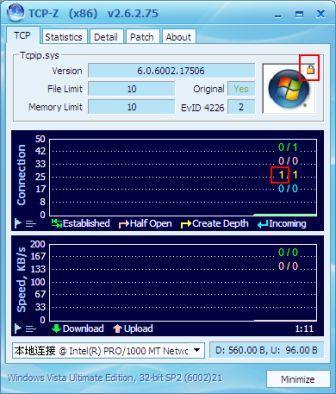
Tip: It’s possible to check the current value for TcpCreateAndConnectTcbRateLimitDepth in the kernel memory with TCP-Z.

TCP-Z Displays TCP/IP Connection Limits

The value is reflected by Create Depth (yellow) item in the graph of TCP-Z and the lock icon.

Half-Open Outbound TCP Connections Limit Removed in Windows 7 and Vista SP2 (No Patch Required)

Looking for half-open concurrent TCP connections limit patcher? Microsoft introduces a limit (of 10) to restrict number of allowed simultaneous outgoing half-open TCP connections in Windows XP SP2 in a bid to prevent virus or malicious program to make unlimited infectious connections to other system when a PC is compromised. The limit continues to exist in Windows Vista RTM and SP1. Result is event ID 4226 with error message “TCP/IP has reached the security limit imposed on the number of concurrent TCP connect attempts”, and fanatic search for patched TCPIP.sys or half-open TCP connections limit memory value crack by many Windows users, especially P2P and torrent downloaders.


Microsoft appears to have a change of heart on the half-open outbound TCP connection attempts limit with the release of Windows Vista SP2 and Windows 7, probably due to the fact that the limit never effective in stopping the spreading of worms and viruses, or Microsoft has grown more confident about security feature of newer operating system.

According to Notable Changes in Windows Server 2008 SP2 and Windows Vista SP2 document published in conjunction with the release of SP2 RTM:

SP2 removes the limit of 10 half open outbound TCP connections. By default, SP2 has no limit on the number of half open outbound TCP connections.

The complete removal of the limit for half-open outbound TCP connections, which is defaulted to 10, was finalized with the release of Windows Server 2008 and Vista SP2 Build 17506. In fact, the half-open outgoing TCP connection limit has been bypassed by default since Windows Vista SP2 RC Build 16670. Previously, the changelog of SP2 showed that Microsoft looks like going to “add a registry key that enables modification of the maximum number of open TCP connections to increase application compatibility”.

Instead, Microsoft adds a registry key that allows user or administrator to enable (turn on) or disable (turn off) the half-open TCP connections limit in Windows Vista with Service Pack 2 and in Windows Server 2008 with Service Pack 2. The registry key is EnableConnectionRateLimiting. The Knowledge Base article KB969710 confirms that the half-open TCP connections limit is disabled in Windows Server 2008 with Service Pack 2 (SP2) and in Windows Vista with Service Pack 2 (SP2).

What the EnableConnectionRateLimiting does it that if its value if 0 or non-existent (Disabled), the operating sysstem will set the TcpCreateAndConnectTcbRateLimitDepth value 0 in the kernel memory, and the half-open outgoing TCP connections limit is removed immediate, without having to restart. The system will treat the new half-open TCP connections as always 0, and thus bypass the limit comparison altogether. Thus, you will notice that event ID 4226 will no longer been logged in Event Viewer. Likewise, when the EnableConnectionRateLimiting is set to 1 (Enabled), TcpCreateAndConnectTcbRateLimitDepth will also be set from 0 to 1 in the kernel memory, the OS will calculate the rated speed of ‘create and connect’ TCP connections been established, and limit the maximum attempts to 10.

Best of all, the similar behavior on outgoing half-open TCP connections and EnableConnectionRateLimiting registry key have been implemented in Windows 7 too, enable Windows 7 users to achieve full connection speed and potential.

Hence, the newest method on how to patch TCPIP.sys or remove and disable half-open outbound TCP connections limit:

  • Windows XP SP2 or Windows XP SP3: Event ID 4226 Patcher by lvllord.de or Universal Tcpip.sys Patch is working fine to patch the TCPIP.sys to set a higher limit or remove the limit to virtually allow unlimited half-open connections.
  • Windows Vista or Windows Vista SP1: Upgrade to Windows Vista SP2 and no change is necessary. By default, the system does not limit the amount of half-open outgoing TCP connections system can create concurrently. If you want peach of mind, it’s also possible to set the registry key to disable half-open outbound TCP connections limit.
  • Windows 7: Half-open TCP connections limit is not implemented in Windows 7 since Windows 7 Beta release. So no patch is necessary.

Tip: It’s possible to check the current value for TcpCreateAndConnectTcbRateLimitDepth in the kernel memory with TCP-Z.

TCP-Z Displays TCP/IP Connection Limits

The value is reflected by Create Depth (yellow) item in the graph of TCP-Z and the lock icon.

Half-Open Outbound TCP Connections Limit Removed in Windows 7 and Vista SP2 (No Patch Required)

Looking for half-open concurrent TCP connections limit patcher? Microsoft introduces a limit (of 10) to restrict number of allowed simultaneous outgoing half-open TCP connections in Windows XP SP2 in a bid to prevent virus or malicious program to make unlimited infectious connections to other system when a PC is compromised. The limit continues to exist in Windows Vista RTM and SP1. Result is event ID 4226 with error message “TCP/IP has reached the security limit imposed on the number of concurrent TCP connect attempts”, and fanatic search for patched TCPIP.sys or half-open TCP connections limit memory value crack by many Windows users, especially P2P and torrent downloaders.


Microsoft appears to have a change of heart on the half-open outbound TCP connection attempts limit with the release of Windows Vista SP2 and Windows 7, probably due to the fact that the limit never effective in stopping the spreading of worms and viruses, or Microsoft has grown more confident about security feature of newer operating system.

According to Notable Changes in Windows Server 2008 SP2 and Windows Vista SP2 document published in conjunction with the release of SP2 RTM:

SP2 removes the limit of 10 half open outbound TCP connections. By default, SP2 has no limit on the number of half open outbound TCP connections.

The complete removal of the limit for half-open outbound TCP connections, which is defaulted to 10, was finalized with the release of Windows Server 2008 and Vista SP2 Build 17506. In fact, the half-open outgoing TCP connection limit has been bypassed by default since Windows Vista SP2 RC Build 16670. Previously, the changelog of SP2 showed that Microsoft looks like going to “add a registry key that enables modification of the maximum number of open TCP connections to increase application compatibility”.

Instead, Microsoft adds a registry key that allows user or administrator to enable (turn on) or disable (turn off) the half-open TCP connections limit in Windows Vista with Service Pack 2 and in Windows Server 2008 with Service Pack 2. The registry key is EnableConnectionRateLimiting. The Knowledge Base article KB969710 confirms that the half-open TCP connections limit is disabled in Windows Server 2008 with Service Pack 2 (SP2) and in Windows Vista with Service Pack 2 (SP2).

What the EnableConnectionRateLimiting does it that if its value if 0 or non-existent (Disabled), the operating sysstem will set the TcpCreateAndConnectTcbRateLimitDepth value 0 in the kernel memory, and the half-open outgoing TCP connections limit is removed immediate, without having to restart. The system will treat the new half-open TCP connections as always 0, and thus bypass the limit comparison altogether. Thus, you will notice that event ID 4226 will no longer been logged in Event Viewer. Likewise, when the EnableConnectionRateLimiting is set to 1 (Enabled), TcpCreateAndConnectTcbRateLimitDepth will also be set from 0 to 1 in the kernel memory, the OS will calculate the rated speed of ‘create and connect’ TCP connections been established, and limit the maximum attempts to 10.

Best of all, the similar behavior on outgoing half-open TCP connections and EnableConnectionRateLimiting registry key have been implemented in Windows 7 too, enable Windows 7 users to achieve full connection speed and potential.

Hence, the newest method on how to patch TCPIP.sys or remove and disable half-open outbound TCP connections limit:

  • Windows XP SP2 or Windows XP SP3: Event ID 4226 Patcher by lvllord.de or Universal Tcpip.sys Patch is working fine to patch the TCPIP.sys to set a higher limit or remove the limit to virtually allow unlimited half-open connections.
  • Windows Vista or Windows Vista SP1: Upgrade to Windows Vista SP2 and no change is necessary. By default, the system does not limit the amount of half-open outgoing TCP connections system can create concurrently. If you want peach of mind, it’s also possible to set the registry key to disable half-open outbound TCP connections limit.
  • Windows 7: Half-open TCP connections limit is not implemented in Windows 7 since Windows 7 Beta release. So no patch is necessary.

Tip: It’s possible to check the current value for TcpCreateAndConnectTcbRateLimitDepth in the kernel memory with TCP-Z.

TCP-Z Displays TCP/IP Connection Limits

The value is reflected by Create Depth (yellow) item in the graph of TCP-Z and the lock icon.

4 Haziran 2009 Perşembe

Windows 7 Build 7201 Download Leaked

Just a week after the last leak of Build 7137, Windows 7 Build 7201 leaks today and can be found on major BitTorrent networks. This build is one build after the much talked about RC2 build of 7200, now known as the IDX (Internal Developer Client and Server) milestone. A tweet from Microsoft Netherlands employee Ruud de Jonge a couple hours ago confirms the existence of a Build 7201.The build was compiled on June 1st, and is only three days old. Wzor originally reported that Windows 7 Build 7200 would be distributed via Connect to Subscribers and TAP Partners on June 11th.

Like with past builds, this build was leaked by Sukonka again from torrents.ru. Sukonka has been known to be a legitimate and trusted leaker of Windows 7 build. However, the x64 image of the build does not seem to contain a digital signature or a Microsoft copyright. All the files are dated yesterday as well. Updates will be provided on this page once we personally test the build.

Windows 7 Build 7201 Download Leaked

Where are the details?

Windows 7 Build 7201 Download Leaked

As always, make sure that the hashes meet the ones below. Use a program such as MD5Checker to check the MD5 hash of your ISO file.

Windows 7 Build 7201 x86 (32-bit)
Build String: 6.1.7201.0.090601-1516
File Name: 7201.0.090601-1516_x86fre_client_en-us_Retail_Ultimate-GRMCULFRER_EN_DVD.iso
Size: 2,499,923,968 bytes
MD5: 70E48837DD513BA98FE483AFD0746E37
SHA1: F2BC6FC5861C76C401DF6DA7137962C727ED938D
CRC: 102CCA5A

Windows 7 Build 7201 x64 (64-bit)
Build String: 6.1.7201.0.090601-1516
File Name: 7201.0.090601-1516_x64fre_client_en-us_Retail_Ultimate-GRMCULXFRER_EN_DVD.iso
Size: 3,223,117,824 bytes
MD5: A64636ED74E50E7E882CDB5B80A8FCFA
SHA1: 92AC49897DE56F62BF0EF5C138974179EDE74C50
CRС: 0AFDFA70

20 Mayıs 2009 Çarşamba

Disable Aero Snap Auto Maximize and Arrange Window in Windows 7

Windows 7 includes a new feature called Aero Snap that intends to improve open windows management on the desktop. Aero Snap allows user to drag a window to the top of the screen to maximize the window automatically, or to the left or right side of the screen to resize the window to fill and take up half of the screen estate on the moved side automatically. (See also hack to enable Aero Snap on all Windows OS)

AeroSnap is definitely a welcoming feature to many users who need to quickly maximize or half-maximize windows for viewing or comparison. However, some Windows 7 users may have different need or usage behavior, such as those need always drag a window to the edge of the desktop to work on other tasks, or just need to monitor and look at the some tiny corner part of the window. In Windows 7 system with multiple monitors, Aero Snap auto adjustment of window may go erroneous too, where the maximized window may span across multiple monitors, making it harder to read.

Use the trick below to disable and turn off Aero Snap ability to auto arrange or auto maximize window when dragging.

1. Go to Control Panel.
2. Click on Ease of Access link or Ease of Access Center icon.
3. Select Change how your mouse works or Make the mouse easier to use option.
4. Tick the check box for Prevent Windows from being automatically arranged when moved to the edge of the screen with the mouse under “Make it easier to manage windows” section.

Disable Windows 7 Aero Snap Auto Arrange and Maximize Window
5. Click OK or Apply to make the change effective.

Once Aero Snap is disabled, the window won’t be automatically maximized and arranged when window is dragged to the edge of the screen, including both top and sides of the screen.

16 Mayıs 2009 Cumartesi

Tweak-7 Beta 1.0 Build 516


Tweak-7 - the world's first tweaking and optimization software designed for Windows 7 - currently in development - coming later this year.
Tweak-7 comes with heaps of fantastic features, all packed into one single application:

• Be prepared ... Tweak-7: not just another tweaking software.
• Tweak-7: all the vitamins your Windows 7 needs!
• Packed with hundreds of tweaks. Everything you need to customize and tweak your Windows 7 to fit your needs. From startmenu, to desktop tweaks, from taskbar customization to system tweaks.
• Packed with features to optimize your Windows 7 experience. A system cleanup suite never seen before in just one application: an incredible fast registry cleaner, a registry defragmentation feature (compresses the Windows registry), a disk drive clean up utility, and much more ...
• All the vitamins your Windows 7 needs. 3D system performance analyzation combined with heaps of system related tweaks to optimize your Windows 7 in speed and reliability. System restrictions: you allow what is allowed on your system and what is not: protected folders, protected applications.
• Automatic internet connection optmization. Tweak-7 includes an internet connection analyzer, which automatically inspects your internet connection to speed it up by up to 25% - this incredible new feature is a must for every Windows 7 user used to browse the net at high speed!

Changes in Tweak-7 Beta v1.0 Build 515 - May 15th 2009:
- Several changes and minor fixes in the FileWiper feature
- Several changes and fixes in the System CleanUp feature
- Fixing an issue in the Registry Defrag feature that caused a crash when the Defragment button was clicked
- Fixing a GUI issue that mixed up the user interface when the main window was restored from the system tray
* Several changes to the Startmenu tweaks feature
* Some design changes

A public beta version of Tweak-7 is available for download below. The beta version is fully functional for a period of 14 days and can be downloaded and installed by everybody running any version of Windows 7. Upcoming beta versions will extend the testing period.

Homepage - http://www.totalidea.com

Size: 18.4 MB

Download Basic (32bit + 64bit)

Windows 7 Ultimate Build 7127 Leaked

Just barely a week after Microsoft officially made available Windows 7 RC download with the build version of 7100 publicly, a newer build of Windows 7 has been compiled by Microsoft and released to internal testers. And of course, the Windows 7 build 7127, which is post-Release Candidate build on the RTM-branch of Windows 7 operating system development tree has also been leaked to BitTorrent (BT) network, in the form of complete ISO files.

Microsoft has specified that there will only one and final release candidate available officially before the final RTM general availability release of Windows 7. Thus, unofficial leaked post-RC builds are the best shots Windows 7 enthusiasts can get a hand on the newer interim build of Windows 7. However, Windows 7 Build 7127 appears to not much different from Windows 7 RC build 7100 in term of user interface. However, there will be bug fixes and under the hood changes.

Windows 7 Build 7127 has full build version number of 7127.0.090507.1820, appears to be finalized on May 7, 2009. Windows 7 Build 7127 is the first post-RC build that leaks to date. Windows 7 Build 7106, which only has Chinese version leaked, are likely to be a pre-RC release.

Windows 7 Build 7127 has 32-bit (x86) and 64-bit (x64) DVD ISO images ready for authorized testers on Microsoft Connect, in the following name:

32bit: 7127.0.090507-1820_x86fre_client_en-us_Retail_Ultimate-GRMCULFRER_EN_DVD.iso
64bit: 7127.0.090507-1820_x64fre_client_en-us_Retail_Ultimate-GRMCULXFRER_EN_DVD.iso

The full ISO information for 32 and 64-bit is as follows:

7127.0.090507-1820_x86fre_client_en-us_Retail_Ultimate-GRMCULFRER_EN_DVD.iso

MD5 Hash : 4045CB2A8E50B65ED9E1C2B8D6026B2F
SHA1 Hash : F2D615E674B64053D299CFA5E80B777269F0DFF2
CRC-32 : F691687F

7127.0.090507-1820_x64fre_client_en-us_Retail_Ultimate-GRMCULXFRER_EN_DVD.iso

MD5 Hash : F805A6595DDC6D12956588BB0F1B9B83
SHA1 Hash : 9BEB69BE3C2D113ECEB944145951A2123FBBBBF8
CRC-32 : 460FAD4E

Free Windows 7 RC Activation Product Keys

MM7DF-G8XWM-J2VRG-4M3C4-GR27X
JYDV8-H8VXG-74RPT-6BJPB-X42V4
KGMPT-GQ6XF-DM3VM-HW6PR-DX9G8
MVBCQ-B3VPW-CT369-VM9TB-YFGBP
KBHBX-GP9P3-KH4H4-HKJP4-9VYKQ
7XRCQ-RPY28-YY9P8-R6HD8-84GH3
RFFTV-J6K7W-MHBQJ-XYMMJ-Q8DCH
482XP-6J9WR-4JXT3-VBPP6-FQF4M
D9RHV-JG8XC-C77H2-3YF6D-RYRJ9
BCGX7-P3XWP-PPPCV-Q2H7C-FCGFR
RGQ3V-MCMTC-6HP8R-98CDK-VP3FM
Q3VMJ-TMJ3M-99RF9-CVPJ3-Q7VF3
6JQ32-Y9CGY-3Y986-HDQKT-BPFPG
P72QK-2Y3B8-YDHDV-29DQB-QKWWM
6F4BB-YCB3T-WK763-3P6YJ-BVH24
9JBBV-7Q7P7-CTDB7-KYBKG-X8HHC
C43GM-DWWV8-V6MGY-G834Y-Y8QH3
GPRG6-H3WBB-WJK6G-XX2C7-QGWQ9
MT39G-9HYXX-J3V3Q-RPXJB-RQ6D7
MVYTY-QP8R7-6G6WG-87MGT-CRH2P

13 Mayıs 2009 Çarşamba

Tweak-7 Beta 1.0 Build 507


Tweak-7 - the world's first tweaking and optimization software designed for Windows 7 - currently in development - coming later this year.
Tweak-7 comes with heaps of fantastic features, all packed into one single application:

• Be prepared ... Tweak-7: not just another tweaking software.
• Tweak-7: all the vitamins your Windows 7 needs!
• Packed with hundreds of tweaks. Everything you need to customize and tweak your Windows 7 to fit your needs. From startmenu, to desktop tweaks, from taskbar customization to system tweaks.
• Packed with features to optimize your Windows 7 experience. A system cleanup suite never seen before in just one application: an incredible fast registry cleaner, a registry defragmentation feature (compresses the Windows registry), a disk drive clean up utility, and much more ...
• All the vitamins your Windows 7 needs. 3D system performance analyzation combined with heaps of system related tweaks to optimize your Windows 7 in speed and reliability. System restrictions: you allow what is allowed on your system and what is not: protected folders, protected applications.
• Automatic internet connection optmization. Tweak-7 includes an internet connection analyzer, which automatically inspects your internet connection to speed it up by up to 25% - this incredible new feature is a must for every Windows 7 user used to browse the net at high speed!

Changes in Tweak-7 Beta v1.0 Build 507 - May 12th 2009:
- Fixing several exceptions that occurred in relation to missing files and directories
- Fixing an incorrect date format conversion on start up
- Fixing a delay during setup that caused the setup to freeze for a couple of seconds
- Fixing a few issues in the 'Autostart Manager' feature where autostarts were not created properly if UAC was enabled
* Date conversion on start up improved to work with some special system date formats
- Fixing some unlogical behaviors related to the password protection feature of Tweak-7
- Several minor changes and fixes

A public beta version of Tweak-7 is available for download below. The beta version is fully functional for a period of 14 days and can be downloaded and installed by everybody running any version of Windows 7. Upcoming beta versions will extend the testing period.

Homepage - http://www.totalidea.com

Size: 21.6 MB

Download Basic (32bit + 64bit)

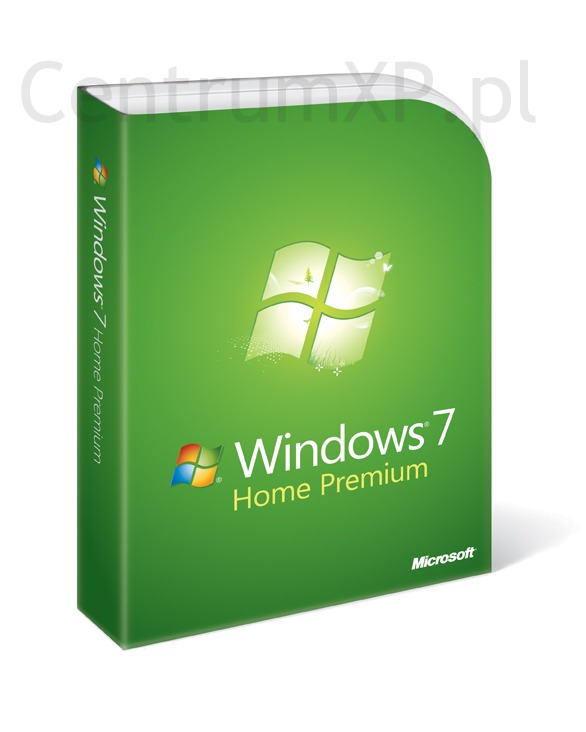
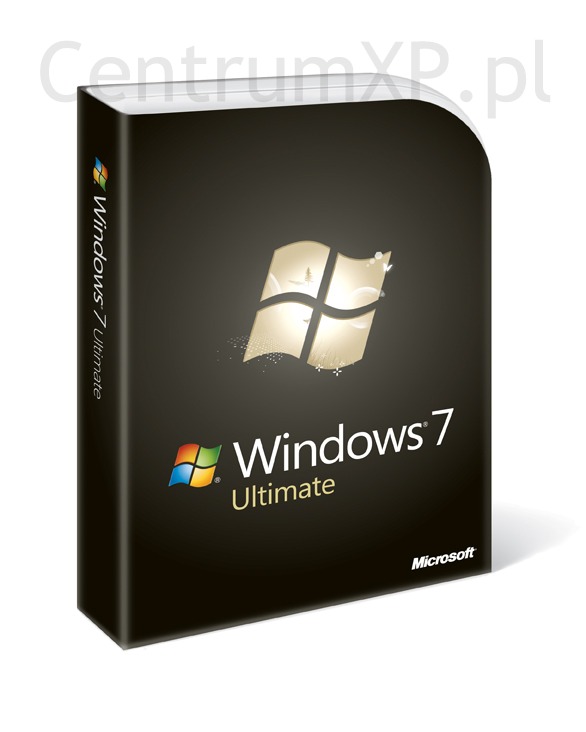
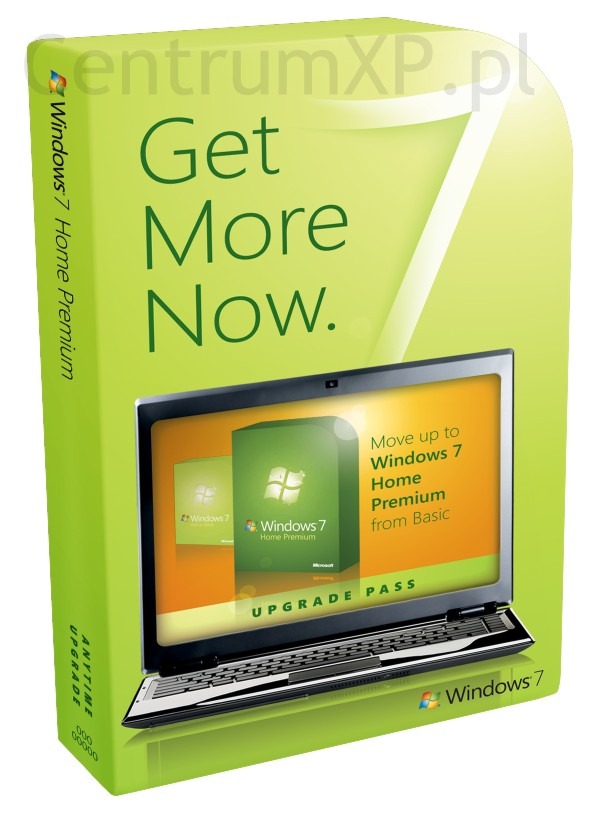
Windows 7 box art leaks

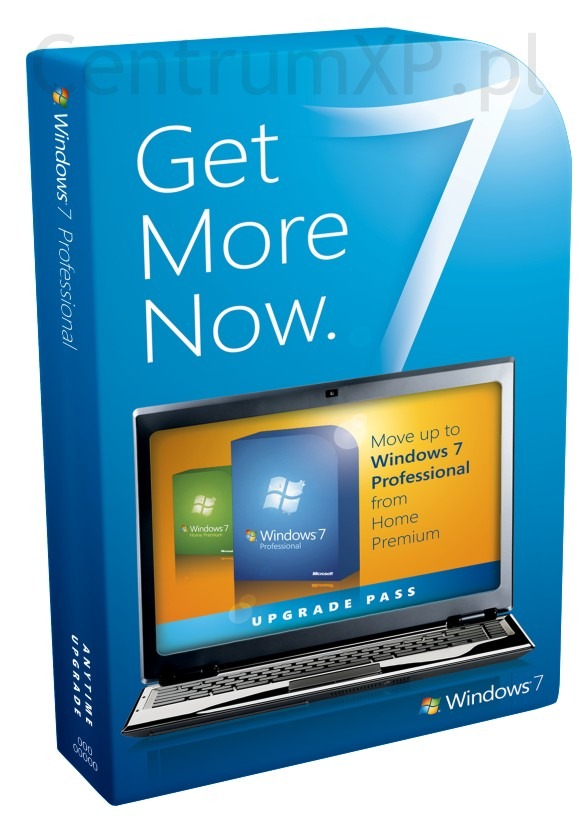
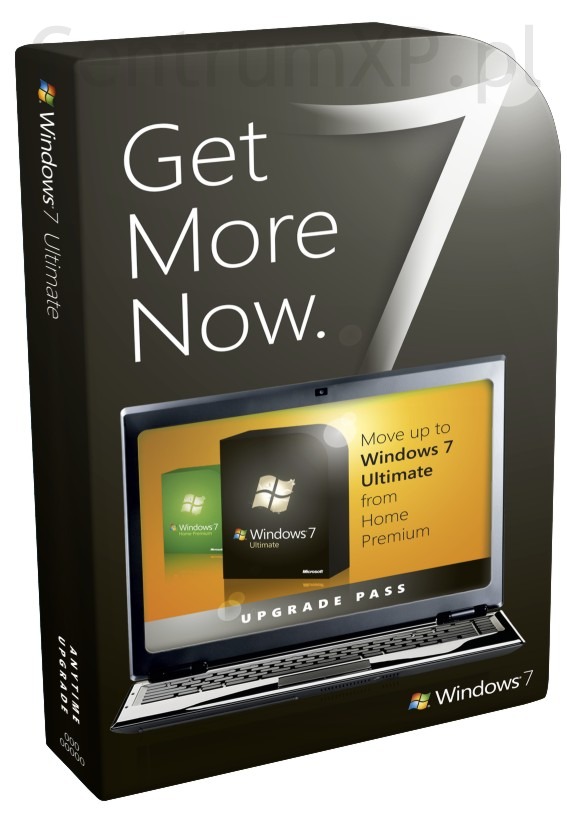
Potential Windows 7 box art leaked earlier this week from Polish site Centrumxp.

Originally many speculated that these images were fake but blogger Long Zheng has unearthed Microsoft using the same logo on the box art, elsewhere.

Microsoft has created a Windows Lounge site for internal employees to join a Facebook group for information, training and marketing for Windows 7. The group uses the following image for its logo:


Compared to the box art that was leaked it's too similar. It appears as though this could be concept or final box art for the Windows 7 packaging. Microsoft officials have said "off the record" that Windows 7 will RTM in the Summer and be available for the Fall. It's not unreasonable for the company to be finalising marketing materials, logos and packaging at this stage.

Windows 7 Home Premium:


Windows 7 pro:


Windows 7 Ultimate:


Windows 7 Home Premium upgrade:


Windows 7 pro upgrade:


Windows 7 Ultimate upgrade: