 Steve Langasek has announced the availability of the release candidate for Ubuntu 9.04 "Jaunty Jackalope": "The Ubuntu team is pleased to announce the Release Candidate for Ubuntu 9.04 Desktop and Server editions and Ubuntu Netbook Remix. Ubuntu 9.04 Desktop edition brings faster boot speeds and a new notification system to your everyday computing experience. Ubuntu 9.04 Server edition makes it easy to experiment with cloud computing using Eucalyptus on your own servers, and sports an improved mail server integration stack based on Postfix and Dovecot. Ubuntu 9.04 Netbook Remix brings a new, easy-to-use interface that is designed to be used on the smaller screens of netbook devices." Read the release announcement and release notes for a detailed list of changes and new features. Download (MD5): ubuntu-9.04-rc-desktop-i386.iso (699MB, torrent), ubuntu-9.04-rc-desktop-amd64.iso (698MB, torrent). Also released today: Kubuntu 9.04 RC (release notes), Xubuntu 9.04 RC (release notes), Ubuntu Studio 9.04 RC and Mythbuntu 9.04 RC.
18 Nisan 2009 Cumartesi
Ubuntu 9.04 RC
Steve Langasek has announced the availability of the release candidate for Ubuntu 9.04 "Jaunty Jackalope": "The Ubuntu team is pleased to announce the Release Candidate for Ubuntu 9.04 Desktop and Server editions and Ubuntu Netbook Remix. Ubuntu 9.04 Desktop edition brings faster boot speeds and a new notification system to your everyday computing experience. Ubuntu 9.04 Server edition makes it easy to experiment with cloud computing using Eucalyptus on your own servers, and sports an improved mail server integration stack based on Postfix and Dovecot. Ubuntu 9.04 Netbook Remix brings a new, easy-to-use interface that is designed to be used on the smaller screens of netbook devices." Read the release announcement and release notes for a detailed list of changes and new features. Download (MD5): ubuntu-9.04-rc-desktop-i386.iso (699MB, torrent), ubuntu-9.04-rc-desktop-amd64.iso (698MB, torrent). Also released today: Kubuntu 9.04 RC (release notes), Xubuntu 9.04 RC (release notes), Ubuntu Studio 9.04 RC and Mythbuntu 9.04 RC.


14 Nisan 2009 Salı
Windows 7 build 7106 English Pack (x86 and x64)

All of you know that Windows 7 build 7106 English version is not leaked till now, only Chinese version is out. So for all those people who cant wait for Windows 7 build 7106 English version to be out, here is a English Pack for you…
The installation is a bit complicated..
First of all download pack and extract it in C:\.
You need to copy ALL folders to C:\ and overwrite everything, however it will give you permission problems even if you copy as admin, since lots of files are protected, so what i suggest is to boot it from Win7 English DVD (version doesnt matter), chose repair there and copy from that command prompt with xcopy. If your extracted files are on C:\English.7106.x86, when you are on repair command prompt, then you can simply use 1stcopyme.cmd. If they are not and they are for example on D:\English.7106.x86, then you need to manually copy with xcopy, command is “xcopy * D:\ /S”
Now reboot in to windows, it will still be in chinese, so you run “2ndrunmeasadmin.cmd” as admin doh and apply English.reg in to registry. Reboot and you have 7106 in english 
13 Nisan 2009 Pazartesi
NVIDA GeForce Driver Release 185.68
This driver supports GeForce 9-series, 100-series, and 200-series desktop GPUs.
New in Release 185:
* Adds support for the new GeForce GTX 275 GPU.
* Adds support for Ambient Occlusion – the newest 
* Adds support for CUDA 2.2 for improved performance in GPU Computing applications. See www.nvidia.com/cuda for more details.
* Accelerates performance in several 3D applications. The following are examples of improvements measured with Release 185 drivers vs. Release 182 drivers (results will vary depending on your GPU, system configuration, and game settings):
* Up to 11% performance increase in Call of Duty: World at War
* Up to 5% performance increase Company of Heroes: Opposing Fronts
* Up to 22% performance increase Crysis: Warhead with antialiasing enabled
* Up to 11% performance increase in Fallout 3 with antialiasing enabled
* Up to 14% performance increase in Far Cry 2
* Up to 45% performance increase in Mirror’s Edge with antialiasing enabled
* Supports GeForce Plus Power Pack #3. Download these FREE PhysX and CUDA applications now!
* Numerous bug fixes. Refer to the release documentation notes.
* Users without US English operating
Windows 7 Build 7106 leaked
Somebody please get a plumber over to Redmond, because there's a constant leak happening all over the place. What's on the menu this time? Windows 7, as per usual, this time in build 7106 flavor, both x86 and x64 variations. This is confirmed, by various Neowin members and other trustworthy sources.

The screenshot of the build isn't, as you can see, in English but there are apparently English versions that have been leaked, judging by the following build strings:
7106.0.090408-1623_x86fre_client_en-us_Retail_Ultimate-GRC1CULFRER_EN_DVD.iso
7106.0.090408-1623_x64fre_client_en-us_Retail_Ultimate-GRC1CULXFRER_EN_DVD.iso
It's unclear if this is the RC candidate build, or if Microsoft intends to progress further with their builds, but only time will tell. So far, changes to this build are unclear, but no doubt things will begin to show up soon enough. This build was reportedly going to be leaked a couple of days before it actually was, so that's rather strange.
The screenshot of the build isn't, as you can see, in English but there are apparently English versions that have been leaked, judging by the following build strings:
7106.0.090408-1623_x86fre_client_en-us_Retail_Ultimate-GRC1CULFRER_EN_DVD.iso
7106.0.090408-1623_x64fre_client_en-us_Retail_Ultimate-GRC1CULXFRER_EN_DVD.iso
It's unclear if this is the RC candidate build, or if Microsoft intends to progress further with their builds, but only time will tell. So far, changes to this build are unclear, but no doubt things will begin to show up soon enough. This build was reportedly going to be leaked a couple of days before it actually was, so that's rather strange.
11 Nisan 2009 Cumartesi
Bluetooth 3.0 to be launched on April 21
The anticipated Bluetooth 3.0 is gearing up to be launched this month, on the 21st, according to Wi-Fi Net News. Currently, there is no official list of chip-makers who have partnered up to make this all possible, but it's expected to be released along with the specification later this month.
So, what does this mean for us? Well, first and foremost, dramatically improved Bluetooth speeds. Bluetooth 3.0 will make transferring files a lot faster, because it uses 802.11 technology, and can switch between the faster standard and the slower, previous standard. When the new chip finds another chip or computer that uses the faster 802.11 standard, they both switch to that option and transfer the files needed. Upon doing so, they shift back to the slower standard, to save battery life. This option works without any need to connect to a wireless network to help speed things up, also.
It won't take long for devices to start showing up with the new standard, after the formal announcement, so a better way to wirelessly transfer files isn't far off, folks. Once the official announcement is made, apparently the group behind the standard, the Bluetooth SIG, will have a bunch of products ready to sample.
So, what does this mean for us? Well, first and foremost, dramatically improved Bluetooth speeds. Bluetooth 3.0 will make transferring files a lot faster, because it uses 802.11 technology, and can switch between the faster standard and the slower, previous standard. When the new chip finds another chip or computer that uses the faster 802.11 standard, they both switch to that option and transfer the files needed. Upon doing so, they shift back to the slower standard, to save battery life. This option works without any need to connect to a wireless network to help speed things up, also.
It won't take long for devices to start showing up with the new standard, after the formal announcement, so a better way to wirelessly transfer files isn't far off, folks. Once the official announcement is made, apparently the group behind the standard, the Bluetooth SIG, will have a bunch of products ready to sample.
10 Nisan 2009 Cuma
Upcoming Releases and Announcements
Summary of expected upcoming releases
- 2009-04-06: Mandriva Linux 2009.1 RC2
- 2009-04-13: FreeBSD 7.2-RC1
- 2009-04-16: BlankOn 5.0 Beta
- 2009-04-16: Ubuntu 9.04 RC
- 2009-04-20: FreeBSD 7.2-RC2
- 2009-04-23: Ubuntu 9.04 (see release schedule)
- 2009-04-28: Fedora 11 Preview
- 2009-04-29: Mandriva Linux 2009.1 (see development planning)
- 2009-04-30: BlankOn 5.0 RC
- 2009-05-01: OpenBSD 4.5 (see release information)
- 2009-05-04: FreeBSD 7.2 (see release schedule)
- 2009-05-07: BlankOn 5.0 (see roadmap)
- 2009-05-12: Frugalware Linux 1.1pre1
- 2009-05-14: Ubuntu 9.10 Alpha 1
- 2009-05-26: Fedora 11 (see proposed release schedule)
- 2009-06-11: Ubuntu 9.10 Alpha 2
- 2009-07-02: Ubuntu 8.04.3 LTS (see release schedule)
- 2009-07-07: Frugalware Linux 1.1pre2
- 2009-07-23: Ubuntu 9.10 Alpha 3
- 2009-08-04: Frugalware Linux 1.1rc1
- 2009-08-13: Ubuntu 9.10 Alpha 4
- 2009-08-18: Frugalware Linux 1.1rc2
- 2009-09-01: Frugalware 1.1 (see roadmap)
- 2009-09-03: Ubuntu 9.10 Alpha 5
- 2009-09-17: Ubuntu 9.10 Alpha 6
- 2009-10-01: Ubuntu 9.10 Beta
- 2009-10-22: Ubuntu 9.10 Release Candidate
- 2009-10-29: Ubuntu 9.10 (see release schedule)
Windows 7 has reached build 7079
Wzor is once again reporting that the Windows 7 winmain_win7rc branch has reached 7079.
Yesterday build 7077 leaked via BitTorrent and we speculated this could be the build that would be "renamed" to 7100 for the RC. It appears that isn't the case and Microsoft has built 7078.0.090406-1758 and 7079.0.090407-1902 over the last few days.
We still expect Microsoft to name the RC build shortly and all bets are on 7100. Last month Microsoft hinted at a May public release for the RC.
Yesterday build 7077 leaked via BitTorrent and we speculated this could be the build that would be "renamed" to 7100 for the RC. It appears that isn't the case and Microsoft has built 7078.0.090406-1758 and 7079.0.090407-1902 over the last few days.
We still expect Microsoft to name the RC build shortly and all bets are on 7100. Last month Microsoft hinted at a May public release for the RC.
9 Nisan 2009 Perşembe
µTorrent 1.8.3 Build 15104 Beta/ µTorrent 1.9 Build 14981 Alpha/ 1.8.2 Build 14458 - Stable
 µTorrent is an efficient and feature rich BitTorrent client for Windows sporting a very small footprint. µTorrent was designed to use as little cpu, space and memory as possible while offering all the functionalites expected from advanced clients. With BitTorrent, you can download files faster and contribute by sharing files and bandwidth. µTorrent is an efficient and feature rich BitTorrent client for Windows sporting a very small footprint. µTorrent was designed to use as little cpu, space and memory as possible while offering all the functionalites expected from advanced clients. With BitTorrent, you can download files faster and contribute by sharing files and bandwidth. Most of the features present in other BitTorrent clients are present in µTorrent, including bandwidth prioritization, scheduling, RSS auto-downloading and Mainline DHT (compatible with BitComet). Additionally, µTorrent supports the Protocol Encryption joint specification (compatible with Azureus 2.4.0.0 and above, BitComet 0.63 and above) and peer exchange. µTorrent was written with efficiency in mind. Unlike many torrent clients, it does not hog valuable system resources - typically using less than 6MB of memory, allowing you to use the computer as if it weren't there at all. Additionally, the program itself is contained within a single executable less than 270 KB in size. Various icon, toolbar graphic and status icon replacements are available, and creating your own is very simple. µTorrent also has support for localization, and with a language file present, will automatically switch to your system language. If your language isn't available, you can easily add your own, or edit other existing translations to improve them! The developer puts in a lot of time working on features and making things more user-friendly. Releases only come out when they're ready, with no schedule pressures, so the few bugs that appear are quickly addressed and fixed. Features of "µTorrent": Changes in Version 1.8.2 (build 14458), 2009-02-03: Changes in Version 1.8.3 (build 15104), 2009-04-08: Changes in Version 1.9 (build 14981), 2009-04-01: Homepage - http://utorrent.com Size: 275 KB Download µTorrent 1.9 Build 14981 Alpha |
Google Chrome 2.0.173.1 Beta/ Google Chrome 1.0.154.53
 Google Chrome is a browser that combines a minimal design with sophisticated technology to make the web faster, safer, and easier. It has one box for everything: Type in the address bar and get suggestions for both search and web pages. Will give you thumbnails of your top sites; Access your favorite pages instantly with lightning speed from any new tab.
 Google Chrome is an open source web browser developed by Google. Its software architecture was engineered from scratch (using components from other open source software including WebKit and Mozilla Firefox) to cater for the changing needs of users and acknowledging that today most web sites aren't web pages but web applications. Design goals include stability, speed, security and a clean, simple and efficient user interface.
Security
• Sandboxing
Every tab in Chrome is sandboxed, so that a tab can display contents of a web page and accept user input, but it will not be able to read the user's desktop or personal files. Google say they have "taken the existing process boundary- and made it into a jail". There is an exception to this rule; browser plugins such as Adobe Flash Player do not run within the boundaries of the tab jail, and so users will still be vulnerable to cross-browser exploits based on plugins, until plugins have been updated to work with the new Chrome security. Google has also developed a new phishing blacklist, which will be built into Chrome, as well as made available via a separate public API.
• Privacy
Google announces a so-called incognito mode claiming that it "lets you browse the web in complete privacy because it doesn’t record any of your activity". No features of this, and no implications of the default mode with respect to Google's database are given.
• Speed
Speed improvements are a primary design goal.
Stability
• Multiprocessing
The Gears team were considering a multithreaded browser (noting that a problem with existing web browser implementations was that they are inherently single-threaded) and Chrome implemented this concept with a multiprocessing architecture. A separate process is allocated to each task (eg tabs, plugins), as is the case with modern operating systems. This prevents tasks from interfering with each other which is good for both security and stability; an attacker successfully gaining access to one application does not give them access to all and failure in one application results in a "Sad Tab" screen of death. This strategy exacts a fixed per-process cost up front but results in less memory bloat overall as fragmentation is confined to each process and no longer results in further memory allocations. To complement this, Chrome will also feature a process manager which will allow the user to see how much memory and CPU each tab is using, as well as kill unresponsive tabs.
User interface
• Features
Chrome has added some commonly used plugin-specific features of other browsers into the default package, such as an Incognito tab mode, where no logs of the user activity are stored, and all cookies from the session are discarded. As a part of Chrome's V8 JavaScript virtual machine, pop-up JavaScript windows will not be shown by default, and will instead appear as a small bar at the bottom of the interface until the user wishes to display or hide the window. Chrome will include support for web applications running alongside other local applications on the computer. Tabs can be put in a web-app mode, where the omnibar and controls will be hidden with the goal of allowing the user to use the web-app without the browser "in the way".
• Rendering Engine
Chrome uses the WebKit rendering engine on advice from the Gears team because it is simple, memory efficient, useful on embedded devices and easy to learn for new developers.
• Tabs
While all of the major tabbed web browsers (e.g. Internet Explorer, Firefox) have been designed with the window as the primary container, Chrome will put tabs first (similar to Opera). The most immediate way this will show is in the user interface: tabs will be at the top of the window, instead of below the controls, as in the other major tabbed browsers. In Chrome, each tab will be an individual process, and each will have its own browser controls and address bar (dubbed omnibox), a design that adds stability to the browser. If one tab fails only one process dies; the browser can still be used as normal with the exception of the dead tab. Chrome will also implement a New Tab Page which shows the nine most visited pages in thumbnails, along with the most searched on sites, most recently bookmarked sites, and most recently closed tabs, upon opening a new tab, similar to Opera's "Speed Dial" page.
Homepage - http://www.google.com/chrome/
Size: 8.87 MB
Download Google Chrome 1.0.154.53
Download Portable Google Chrome 1.0.154.48
Download Google Chrome 2.0.173.1
ATI Catalyst 9.4 WHQL Display Driver
 AMD’s award-winning ATI Catalyst graphics and HD video configuration software delivers unprecedented control of performance and visual quality with ATI Radeon™ graphics processors. Certified by Microsoft® Windows® Hardware Quality Labs (WHQL), ATI Catalyst drivers for Windows Vista® and Windows® XP operating systems deliver stable performance and push the limits of innovation with advanced user-oriented features. AMD’s award-winning ATI Catalyst graphics and HD video configuration software delivers unprecedented control of performance and visual quality with ATI Radeon™ graphics processors. Certified by Microsoft® Windows® Hardware Quality Labs (WHQL), ATI Catalyst drivers for Windows Vista® and Windows® XP operating systems deliver stable performance and push the limits of innovation with advanced user-oriented features. Precision controls for power users. Tweaks for gamers and video enthusiasts. Simple wizard-assisted setup, easy multi-monitor configuration, and ultra reliable operation for working professionals. New user or seasoned expert, ATI Catalyst puts you in charge of The Ultimate Visual Experience™. • Industry-leading performance. ATI Catalyst boosts graphics performance with every new monthly release, including enhancements for popular Direct3D and OpenGL game titles. The Catalyst™ Software Suite 9.4 contains the following: Caution: The Catalyst™ software driver and the Catalyst™ Control Center can be downloaded independently of each other. However, for maximum stability and performance AMD recommends that both components be updated from the same Catalyst™ release Caution: The Catalyst™ Control Center requires that the Microsoft .NET Framework version 2.0 be installed. Without .NET version 2.0 installed, the Catalyst™ Control Center will not launch properly and the user will see an error message. The latest version of the Catalyst™ software suite is designed to support the following Microsoft Windows platforms: |
nVidia Forceware 185.68 is out
Windows 7: Tweak your logon screen background
Neowin earlier sighted that Windows 7 users can now change their logon screen background. But in order to customize the logon screen, users had to hack the registry and create a new directory for background images. This feature looks like it is probably designed for OEMs where they can put their own logon screen background.
Windows 7 Starter and Windows 7 Home Basic editions do have the options to change the logon screen background but nothing more than choosing Windows default or OEM background
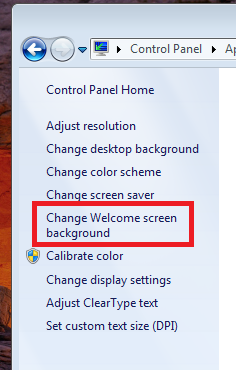
And here is what you get when you choose to change your Welcome Screen

If you do want customize your logon screen backgrounds in Windows 7 and searching for an easier tool than the registry hacks, then look no further than the Tweaks Logon Changer. Tweaks Logon Changer enables you to change your logon screen backgrounds more easily.
Run the Tweeks Logon Changer and select your locally stored custom image, preview the new logon background screen, apply the new logon screen or revert back to the default logon screen.
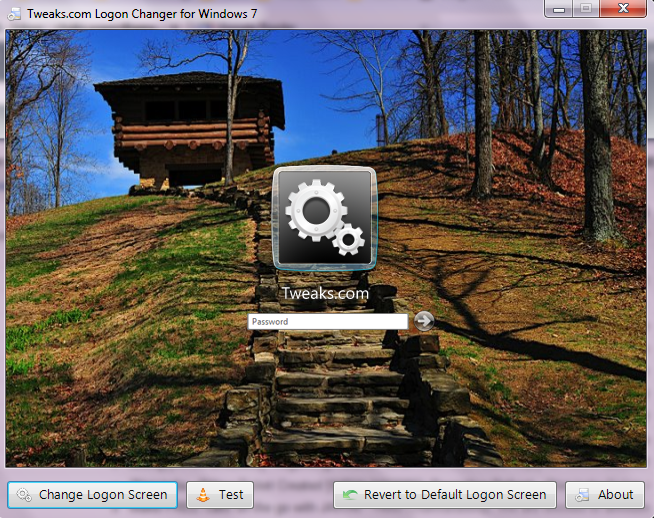
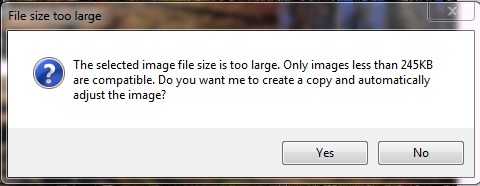
If your image size is greater than 256k, the Tweaks Logon Changer compresses the image and sets the new logon screen leaving the original image unaltered
Windows 7 Starter and Windows 7 Home Basic editions do have the options to change the logon screen background but nothing more than choosing Windows default or OEM background
And here is what you get when you choose to change your Welcome Screen
If you do want customize your logon screen backgrounds in Windows 7 and searching for an easier tool than the registry hacks, then look no further than the Tweaks Logon Changer. Tweaks Logon Changer enables you to change your logon screen backgrounds more easily.
Run the Tweeks Logon Changer and select your locally stored custom image, preview the new logon background screen, apply the new logon screen or revert back to the default logon screen.
If your image size is greater than 256k, the Tweaks Logon Changer compresses the image and sets the new logon screen leaving the original image unaltered
Kaydol:
Kayıtlar (Atom)